> ## Documentation Index
> Fetch the complete documentation index at: https://docs.cubic.dev/llms.txt
> Use this file to discover all available pages before exploring further.
# Subscription
> Free and paid cubic plans.
Start with a 7-day free trial, with no credit card required.
Everyone on your team is enabled by default during the trial.
Choosing a paid plan at checkout starts billing immediately.
After the trial, continue on the free plan or upgrade to a paid plan.
## Free plan
The free plan includes 20 AI reviews per month, shared across repositories in your
GitHub organization. The quota resets on the 1st of each month. Review comments
show how many reviews remain.
## Paid subscriptions
For paid AI review access, cubic's subscription cost is determined by the number of developer seats you choose to activate. Each active seat corresponds to a unique GitHub user within your organization. AI review usage on paid plans is measured in reviewed lines, with an allowance per paid seat that is pooled across your team.
* **Seat-based billing:** You are billed based on the number of *active* seats you assign to your team members (GitHub users).
* **Flexible seat management:** You can manage seat assignments at any time, both during your free trial and after it ends.
* **Customizable checkout:** When you purchase a subscription, you select the exact number of seats you need.
* **Ultrareview:** Paid and trial plans include Ultrareview for high-risk or complex PRs. Ultrareviews count toward your team's reviewed-lines allowance at 3× the standard rate.
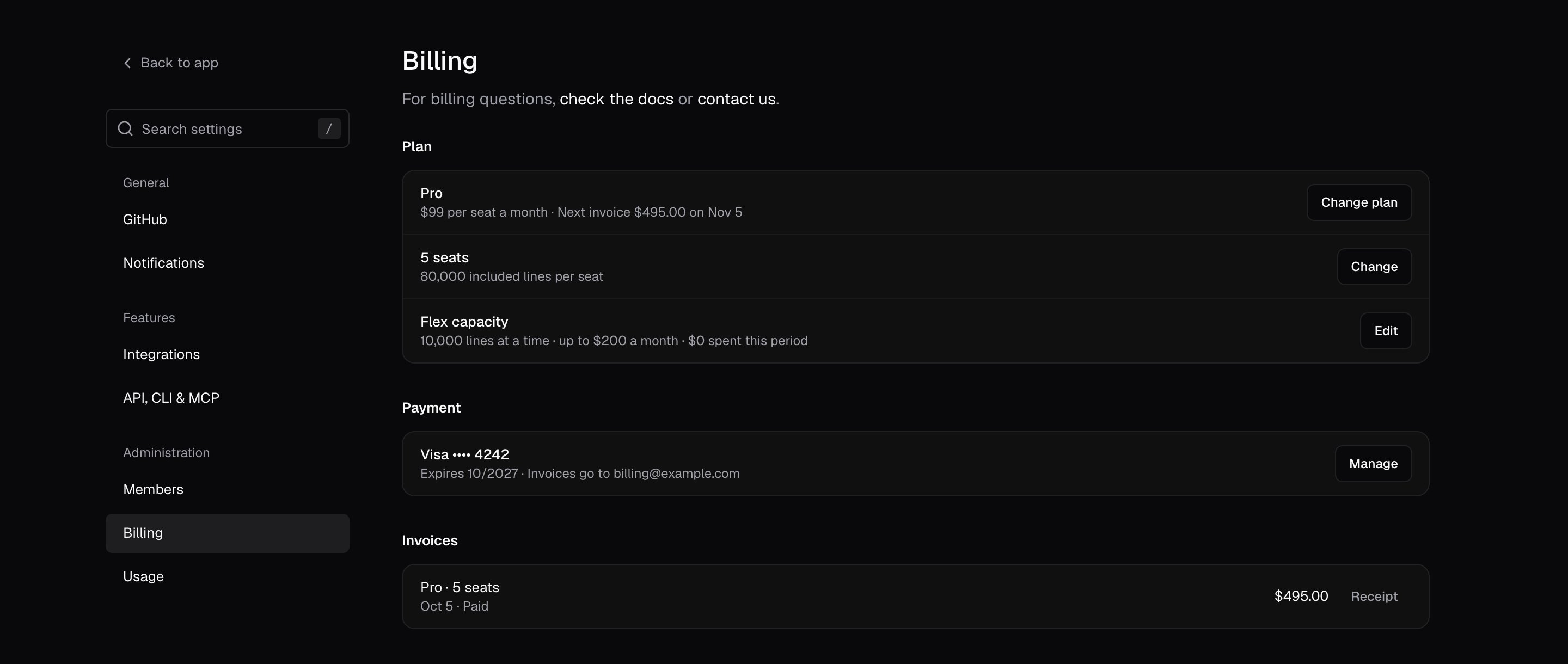
* **Seat and billing management:** Assign seats in [Settings → Members](https://www.cubic.dev/settings?tab=members). Change your plan, seat count, and payment details in [Settings → Billing](https://www.cubic.dev/settings?tab=billing).
 ### Seat scope across organizations
Seat assignments are scoped to the selected GitHub organization. If your company uses cubic in multiple GitHub organizations, assigning a seat in one organization does not automatically assign that user a seat in another organization.
The seat summary in **Settings → Members** applies to the selected organization. For example, `86 of 155 paid seats in use` means that organization has 86 active developer seats out of 155 paid seats. Other linked organizations do not consume that organization's available seats.
### Usage and flex capacity
See [AI review usage and limits](/account/ai-review-usage) for what counts toward your
allowance. Other features, such as local reviews and coding agents, have separate limits.
Enable [flex capacity](/account/flex-capacity) on a paid plan to buy extra
reviewed lines when the included allowance runs out. An admin sets the monthly
spend limit in **Settings → Billing**.
### Assigning seats
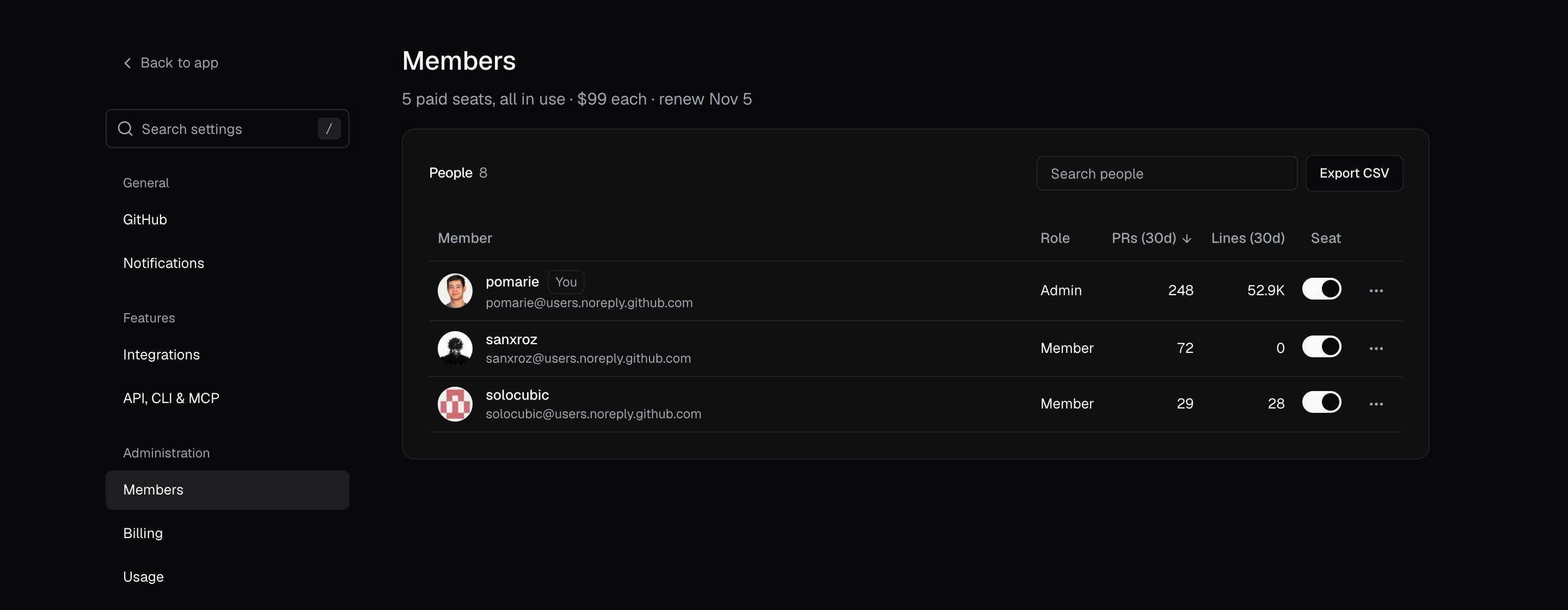
To manage seats as an admin, go to **Settings → Members**:
* Turn on a developer's **Seat** switch to assign a seat, or turn it off to unassign one. cubic asks you to confirm each change.
* When every paid seat is in use, turning a seat on buys another seat, prorated. If more people already have seats than you pay for, it buys enough seats to cover them too. cubic shows the price before you confirm.
* Turning a seat off does not lower your bill. You keep paying for your seat count until you lower it with **Change** on the seats row in **Settings → Billing**.
### Seat scope across organizations
Seat assignments are scoped to the selected GitHub organization. If your company uses cubic in multiple GitHub organizations, assigning a seat in one organization does not automatically assign that user a seat in another organization.
The seat summary in **Settings → Members** applies to the selected organization. For example, `86 of 155 paid seats in use` means that organization has 86 active developer seats out of 155 paid seats. Other linked organizations do not consume that organization's available seats.
### Usage and flex capacity
See [AI review usage and limits](/account/ai-review-usage) for what counts toward your
allowance. Other features, such as local reviews and coding agents, have separate limits.
Enable [flex capacity](/account/flex-capacity) on a paid plan to buy extra
reviewed lines when the included allowance runs out. An admin sets the monthly
spend limit in **Settings → Billing**.
### Assigning seats
To manage seats as an admin, go to **Settings → Members**:
* Turn on a developer's **Seat** switch to assign a seat, or turn it off to unassign one. cubic asks you to confirm each change.
* When every paid seat is in use, turning a seat on buys another seat, prorated. If more people already have seats than you pay for, it buys enough seats to cover them too. cubic shows the price before you confirm.
* Turning a seat off does not lower your bill. You keep paying for your seat count until you lower it with **Change** on the seats row in **Settings → Billing**.
 With Vercel billing, these switches only assign seats you've already bought. Add or remove paid
seats in your Vercel dashboard.
To manage seats from your own scripts, use the [Members API](/account/members-api). With an active
Team, Pro, or Max subscription billed through cubic, an organization admin or an organization API key can
enable or disable existing seats and change roles. The API uses capacity you've already purchased
and never buys more seats.
Members and viewers cannot change seats. See [Roles and permissions](/account/roles-and-permissions)
for the full permission list.
To set a work email for the selected organization, open **Settings → Members**, open the **⋯**
menu on your row, and choose **Edit notification email**. Weekly summaries, trial emails, and
codebase scan completion emails use this address; your GitHub email stays the same.
### Automatic seat management
Turn on **Give new developers a seat automatically** in **Settings → Members** to give a seat to
each developer who joins your GitHub organization or opens their first PR, and to remove seats
when members leave. When every paid seat is in use, cubic buys another seat, prorated. When
someone with a seat leaves your GitHub organization, cubic also lowers your paid seat count,
unlike turning a seat off yourself. These changes affect billing.
With Vercel billing, a developer's first PR doesn't give them a seat. An admin turns their
**Seat** switch on, and you add paid seats in your Vercel dashboard.
Existing manual assignments remain. For example, if 3 of 10 developers have seats,
turning it on gives a seat to the next new developer who opens a PR,
bringing the assigned total to 4. It does not assign the other existing members.
## Bot seat management
cubic creates a separate bot row when a recognized bot, such as
`devin-ai-integration[bot]`, first opens a PR. Bot reviews are disabled by default;
an admin can turn on **Review PRs** for a bot in the bots group at the bottom of
**Settings → Members**. When a bot with reviews turned off opens PRs, a card on that page
suggests turning them on.
Enabled bots do not require paid developer seats. Their reviews consume the team's
shared reviewed-line allowance.
## Frequently asked questions
Pro and Max require a seat for each active developer in the installation, including developers
whose seat toggle is off. Active means opening at least 15 PRs in the last 30 days. Bots are
excluded. This minimum applies because codebase scans on Pro and Max cover the whole repository.
Team does not have this activity-based minimum.
No. Everyone is enabled during the trial so your team can try cubic. Before upgrading, go to
**Settings → Members** and turn off the **Seat** switch for users who do not need seats.
Choose your paid seat count at checkout. Pro and Max still require enough seats to cover the
active-developer minimum.
Check that you're viewing the GitHub organization linked to your cubic integration in Vercel. A
subscription linked to your personal GitHub installation does not automatically cover a separate
organization. If the wrong installation is linked, contact [support](/account/support) with the
organization name and your Vercel subscription details so we can help correct the connection.
Yes. We offer an annual subscription at a 20% discount off the monthly rate. Select "12 months"
on the checkout page, and the discount will apply automatically.
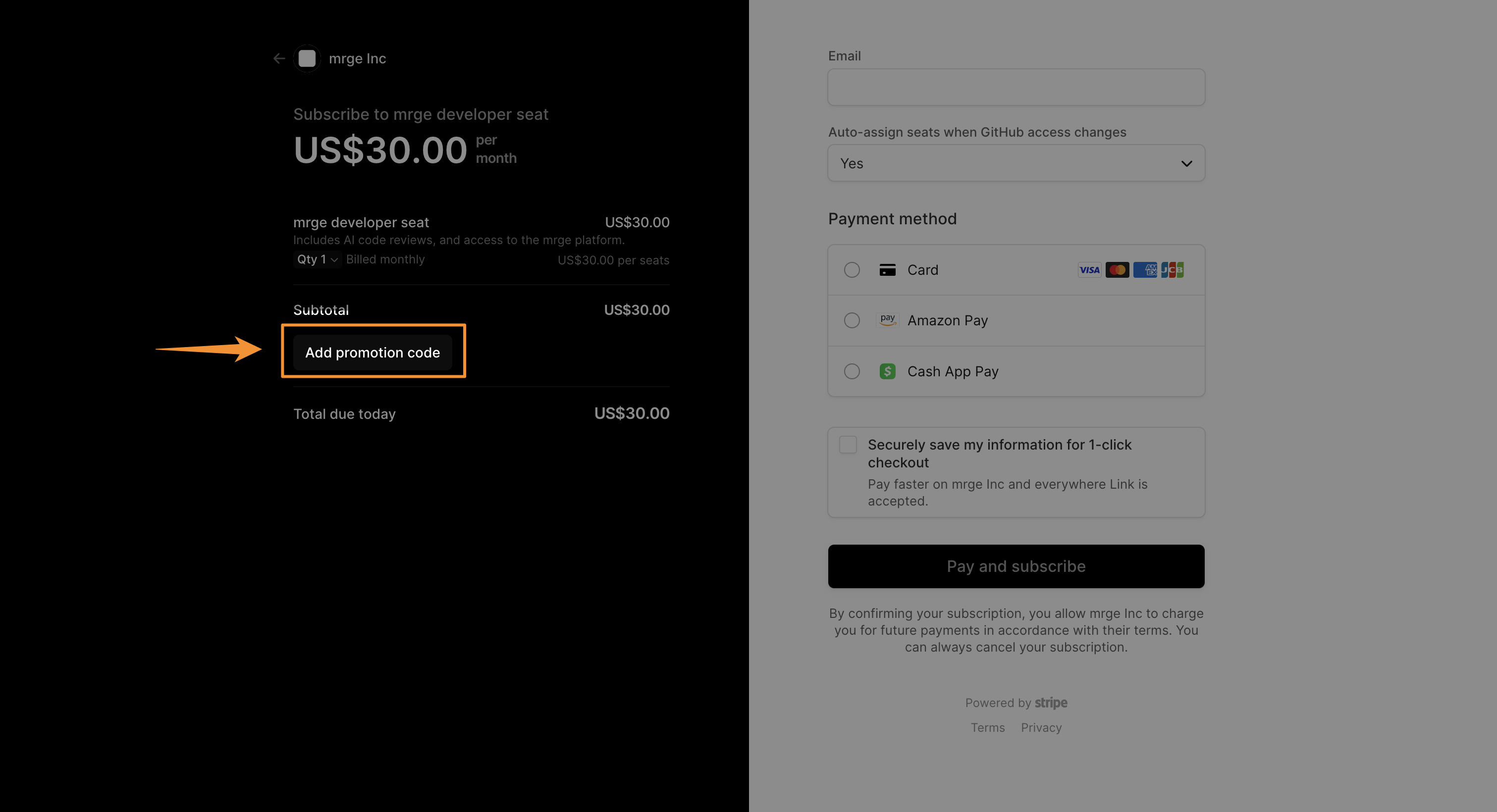
You can enter your coupon or promo code on the subscription checkout screen:
With Vercel billing, these switches only assign seats you've already bought. Add or remove paid
seats in your Vercel dashboard.
To manage seats from your own scripts, use the [Members API](/account/members-api). With an active
Team, Pro, or Max subscription billed through cubic, an organization admin or an organization API key can
enable or disable existing seats and change roles. The API uses capacity you've already purchased
and never buys more seats.
Members and viewers cannot change seats. See [Roles and permissions](/account/roles-and-permissions)
for the full permission list.
To set a work email for the selected organization, open **Settings → Members**, open the **⋯**
menu on your row, and choose **Edit notification email**. Weekly summaries, trial emails, and
codebase scan completion emails use this address; your GitHub email stays the same.
### Automatic seat management
Turn on **Give new developers a seat automatically** in **Settings → Members** to give a seat to
each developer who joins your GitHub organization or opens their first PR, and to remove seats
when members leave. When every paid seat is in use, cubic buys another seat, prorated. When
someone with a seat leaves your GitHub organization, cubic also lowers your paid seat count,
unlike turning a seat off yourself. These changes affect billing.
With Vercel billing, a developer's first PR doesn't give them a seat. An admin turns their
**Seat** switch on, and you add paid seats in your Vercel dashboard.
Existing manual assignments remain. For example, if 3 of 10 developers have seats,
turning it on gives a seat to the next new developer who opens a PR,
bringing the assigned total to 4. It does not assign the other existing members.
## Bot seat management
cubic creates a separate bot row when a recognized bot, such as
`devin-ai-integration[bot]`, first opens a PR. Bot reviews are disabled by default;
an admin can turn on **Review PRs** for a bot in the bots group at the bottom of
**Settings → Members**. When a bot with reviews turned off opens PRs, a card on that page
suggests turning them on.
Enabled bots do not require paid developer seats. Their reviews consume the team's
shared reviewed-line allowance.
## Frequently asked questions
Pro and Max require a seat for each active developer in the installation, including developers
whose seat toggle is off. Active means opening at least 15 PRs in the last 30 days. Bots are
excluded. This minimum applies because codebase scans on Pro and Max cover the whole repository.
Team does not have this activity-based minimum.
No. Everyone is enabled during the trial so your team can try cubic. Before upgrading, go to
**Settings → Members** and turn off the **Seat** switch for users who do not need seats.
Choose your paid seat count at checkout. Pro and Max still require enough seats to cover the
active-developer minimum.
Check that you're viewing the GitHub organization linked to your cubic integration in Vercel. A
subscription linked to your personal GitHub installation does not automatically cover a separate
organization. If the wrong installation is linked, contact [support](/account/support) with the
organization name and your Vercel subscription details so we can help correct the connection.
Yes. We offer an annual subscription at a 20% discount off the monthly rate. Select "12 months"
on the checkout page, and the discount will apply automatically.
You can enter your coupon or promo code on the subscription checkout screen:
 Yes. In [**Settings → Billing**](https://www.cubic.dev/settings?tab=billing), select **Cancel
plan** at the bottom of the page. Your plan stays active until the end of the current billing
period, and you won't be billed again. You can undo it from the same page until then. If a card
payment has failed, cancelling ends the plan right away and voids the plan's unpaid invoices.
Unpaid flex top-ups stay due. If you pay through Vercel, cancel in Vercel instead.
To change your seat count after your subscription has started, go to [**Settings →
Billing**](https://www.cubic.dev/settings?tab=billing) and click **Change** on the seats row. Prorated
charges or credits will be applied based on your changes.
We currently accept all major credit cards (Visa, MasterCard, American Express) and PayPal. For
enterprise customers, we also support ACH bank transfers. Contact support to set them up.
Nonprofits and schools can receive a 50% discount. Please [contact
support](mailto:contact@cubic.dev?subject=Nonprofit%20Discount) to verify your eligibility.
Yes. Public repositories on the free plan use a separate public fair-use allowance. On paid
plans, reviews of public PRs from workspace members count toward the team's reviewed-line
allowance; reviews from external contributors do not. See [public-repository
usage](/account/ai-review-usage#faq) for details.
Cancelling a subscription, disconnecting GitHub, and deleting your account are separate actions.
See the [Support FAQ](/account/support#faq) for each one.
For billing questions, [contact support](/account/support).
This documentation is built and hosted on [Mintlify](https://mintlify.com), a developer documentation platform.
Yes. In [**Settings → Billing**](https://www.cubic.dev/settings?tab=billing), select **Cancel
plan** at the bottom of the page. Your plan stays active until the end of the current billing
period, and you won't be billed again. You can undo it from the same page until then. If a card
payment has failed, cancelling ends the plan right away and voids the plan's unpaid invoices.
Unpaid flex top-ups stay due. If you pay through Vercel, cancel in Vercel instead.
To change your seat count after your subscription has started, go to [**Settings →
Billing**](https://www.cubic.dev/settings?tab=billing) and click **Change** on the seats row. Prorated
charges or credits will be applied based on your changes.
We currently accept all major credit cards (Visa, MasterCard, American Express) and PayPal. For
enterprise customers, we also support ACH bank transfers. Contact support to set them up.
Nonprofits and schools can receive a 50% discount. Please [contact
support](mailto:contact@cubic.dev?subject=Nonprofit%20Discount) to verify your eligibility.
Yes. Public repositories on the free plan use a separate public fair-use allowance. On paid
plans, reviews of public PRs from workspace members count toward the team's reviewed-line
allowance; reviews from external contributors do not. See [public-repository
usage](/account/ai-review-usage#faq) for details.
Cancelling a subscription, disconnecting GitHub, and deleting your account are separate actions.
See the [Support FAQ](/account/support#faq) for each one.
For billing questions, [contact support](/account/support).
This documentation is built and hosted on [Mintlify](https://mintlify.com), a developer documentation platform.