> ## Documentation Index
> Fetch the complete documentation index at: https://docs.cubic.dev/llms.txt
> Use this file to discover all available pages before exploring further.
# AI review settings
> Configure repository-level and organization-level AI review behavior in cubic.
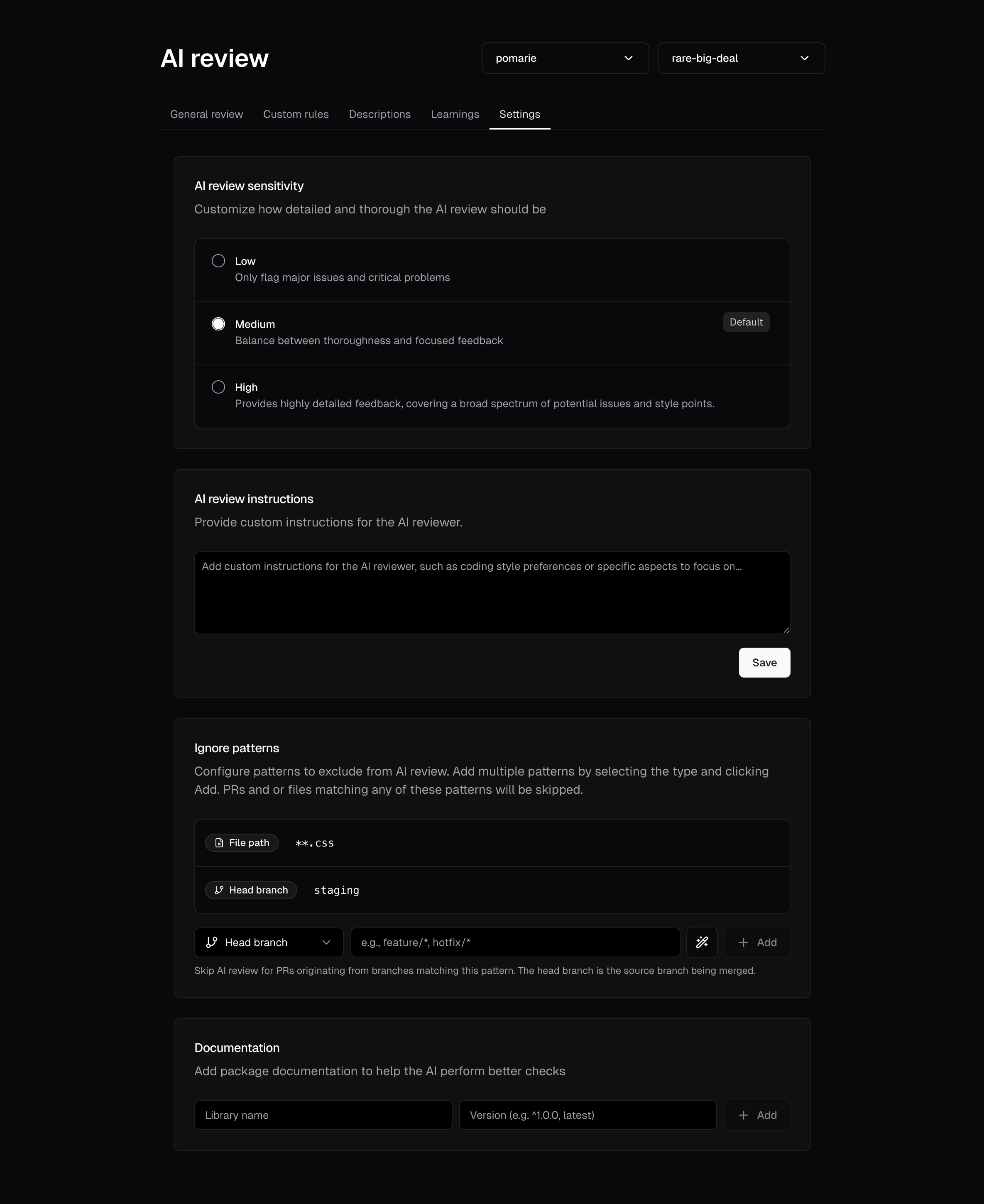
Within your project's [settings](https://cubic.dev/settings), the **AI review** section offers controls to tailor AI review behavior.
 ## Configurable options
AI review settings can be configured for individual repositories or globally for all repositories
in an installation. To update settings for all repositories at once, select "All repositories"
from the repository picker before making changes.
1. **Review instructions**
* Provide general guidelines for the AI in plaintext.
2. **Library & framework versions**
* Specify or override detected versions (e.g., React 18, Django 4) to improve suggestion accuracy.
* Note that, by default, cubic will try to automatically detect the common libraries and versions they use to ensure that it tailors its reviews to those specific ones.
3. **Ignore patterns**
Define comprehensive patterns to control which pull requests and files are reviewed:
* **File path patterns**: Skip files or directories matching glob patterns (e.g., `dist/`, `*.test.ts`)
* **Head branch patterns**: Suppress automatic reviews for PRs from matching branches (e.g., `feature/*`, `hotfix/*`)
* **Base branch patterns**: Suppress automatic reviews for PRs targeting matching branches (e.g., `staging`, `develop`)
* **PR label patterns**: Suppress automatic reviews for PRs with matching labels (e.g., `wip`, `skip-review`)
* **PR title patterns**: Suppress automatic reviews for PRs with matching titles (e.g., `Draft:*`, `WIP:*`)
* **Maximum changed lines**: Store the automatic-review threshold for a PR's reviewable added plus deleted lines. The default is 50,000 lines, and leaving the setting absent or blank uses that default. cubic preserves positive integers up to 2,147,483,647, but applies an effective ceiling of 50,000 reviewable lines to every review. Manual `@cubic-dev-ai review` requests can bypass a lower repository threshold, but not the effective ceiling.
Pull request label, title, and branch patterns suppress automatic reviews. You can still request a review on a matching PR with `@cubic-dev-ai review`. File path patterns continue to apply to manually requested reviews, so matching files remain excluded.
4. **Exclude generated files**
For large repositories, you can tell cubic to ignore files that don't require review. This is handy for:
* Data files that don’t need to be reviewed
* Auto‑generated code produced by build or code‑gen tools
* Any other files that would make a pull request too large for cubic to process
You can do this by marking files as generated in your repository’s `.gitattributes` file:
```gitattributes theme={null}
# Exclude specific files
docs/data.txt linguist-generated=true
# Exclude file types
*.csv linguist-generated=true
*.pb.go linguist-generated=true
# Exclude entire directories
data/* linguist-generated=true
generated/* linguist-generated=true
```
Files marked as `linguist-generated` will be:
* Automatically collapsed in GitHub pull request views
* Skipped entirely during **cubic**'s code review
5.
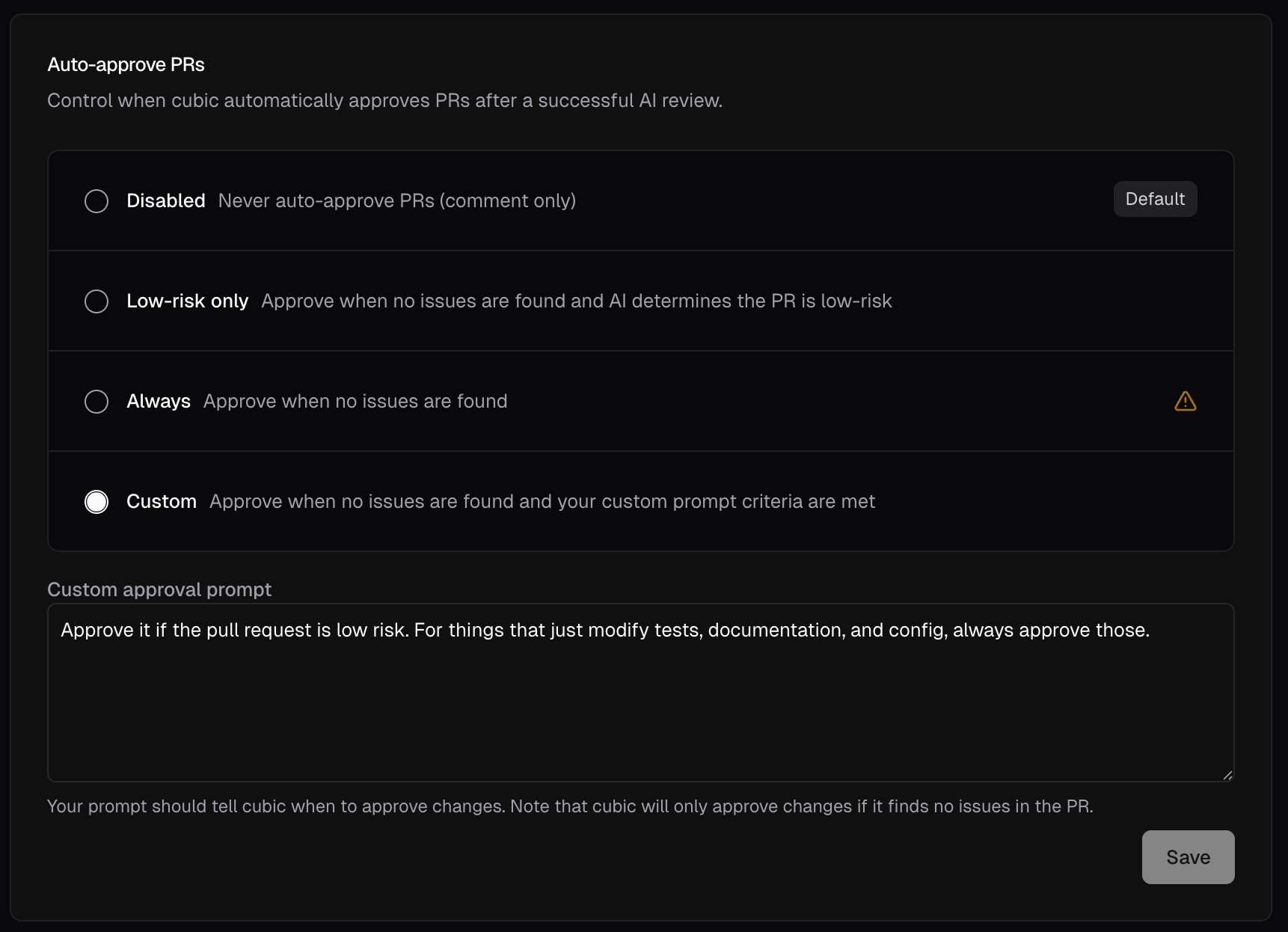
Automatic PR approval
* When enabled, cubic can evaluate clean pull requests for automatic approval
* Disabled by default to prevent bypassing branch protection rules
* Only available when general AI review is enabled
* Useful when you want to start in a safe dry-run mode, confirm your approval policy matches team expectations, and only later allow cubic to submit real approvals
Behavior controls:
* **Disabled**: cubic only comments on PRs and skips auto-approval evaluation
* **Shadow**: cubic evaluates whether the PR would be approved, but still posts a normal review comment instead of a real GitHub approval
* **Live**: cubic evaluates the PR and submits a real GitHub approval when the selected policy allows it
Approval policy controls:
* **Low-risk only**: Approves only when no open issues block approval and cubic determines the PR is low-risk
* **Always**: Approves any clean PR, regardless of risk level
* **Custom**: Define your own criteria via a custom prompt. For example, only approve documentation changes while requiring human review for source code modifications
* **Allow open issues**: Approve even while cubic issues at the chosen priorities stay open. Choosing a priority also includes every lower one; none are selected by default. See [Allow open issues](/ai-review/auto-approval#allow-open-issues).
* **Never auto-approve**: Add file or directory globs that block auto-approval. If any changed file in a PR matches, cubic will not auto-approve that PR.
* **Only auto-approve files**: Add file or directory globs that define an allowlist. Every changed path must match at least one glob. Renamed files must match on both their current and previous paths.
* **Do not auto-approve external contributors**: For public repositories, cubic still reviews PRs from external contributors, but leaves a comment review instead of approving. cubic does the same when it can't confirm who the author is. On by default for new settings; existing settings keep their saved value.
Shadow mode is useful when you want to test your approval policy safely before letting cubic approve pull requests automatically. See [Auto-approval](/ai-review/auto-approval) for setup steps, YAML configuration, safeguards, and troubleshooting.
## Configurable options
AI review settings can be configured for individual repositories or globally for all repositories
in an installation. To update settings for all repositories at once, select "All repositories"
from the repository picker before making changes.
1. **Review instructions**
* Provide general guidelines for the AI in plaintext.
2. **Library & framework versions**
* Specify or override detected versions (e.g., React 18, Django 4) to improve suggestion accuracy.
* Note that, by default, cubic will try to automatically detect the common libraries and versions they use to ensure that it tailors its reviews to those specific ones.
3. **Ignore patterns**
Define comprehensive patterns to control which pull requests and files are reviewed:
* **File path patterns**: Skip files or directories matching glob patterns (e.g., `dist/`, `*.test.ts`)
* **Head branch patterns**: Suppress automatic reviews for PRs from matching branches (e.g., `feature/*`, `hotfix/*`)
* **Base branch patterns**: Suppress automatic reviews for PRs targeting matching branches (e.g., `staging`, `develop`)
* **PR label patterns**: Suppress automatic reviews for PRs with matching labels (e.g., `wip`, `skip-review`)
* **PR title patterns**: Suppress automatic reviews for PRs with matching titles (e.g., `Draft:*`, `WIP:*`)
* **Maximum changed lines**: Store the automatic-review threshold for a PR's reviewable added plus deleted lines. The default is 50,000 lines, and leaving the setting absent or blank uses that default. cubic preserves positive integers up to 2,147,483,647, but applies an effective ceiling of 50,000 reviewable lines to every review. Manual `@cubic-dev-ai review` requests can bypass a lower repository threshold, but not the effective ceiling.
Pull request label, title, and branch patterns suppress automatic reviews. You can still request a review on a matching PR with `@cubic-dev-ai review`. File path patterns continue to apply to manually requested reviews, so matching files remain excluded.
4. **Exclude generated files**
For large repositories, you can tell cubic to ignore files that don't require review. This is handy for:
* Data files that don’t need to be reviewed
* Auto‑generated code produced by build or code‑gen tools
* Any other files that would make a pull request too large for cubic to process
You can do this by marking files as generated in your repository’s `.gitattributes` file:
```gitattributes theme={null}
# Exclude specific files
docs/data.txt linguist-generated=true
# Exclude file types
*.csv linguist-generated=true
*.pb.go linguist-generated=true
# Exclude entire directories
data/* linguist-generated=true
generated/* linguist-generated=true
```
Files marked as `linguist-generated` will be:
* Automatically collapsed in GitHub pull request views
* Skipped entirely during **cubic**'s code review
5.
Automatic PR approval
* When enabled, cubic can evaluate clean pull requests for automatic approval
* Disabled by default to prevent bypassing branch protection rules
* Only available when general AI review is enabled
* Useful when you want to start in a safe dry-run mode, confirm your approval policy matches team expectations, and only later allow cubic to submit real approvals
Behavior controls:
* **Disabled**: cubic only comments on PRs and skips auto-approval evaluation
* **Shadow**: cubic evaluates whether the PR would be approved, but still posts a normal review comment instead of a real GitHub approval
* **Live**: cubic evaluates the PR and submits a real GitHub approval when the selected policy allows it
Approval policy controls:
* **Low-risk only**: Approves only when no open issues block approval and cubic determines the PR is low-risk
* **Always**: Approves any clean PR, regardless of risk level
* **Custom**: Define your own criteria via a custom prompt. For example, only approve documentation changes while requiring human review for source code modifications
* **Allow open issues**: Approve even while cubic issues at the chosen priorities stay open. Choosing a priority also includes every lower one; none are selected by default. See [Allow open issues](/ai-review/auto-approval#allow-open-issues).
* **Never auto-approve**: Add file or directory globs that block auto-approval. If any changed file in a PR matches, cubic will not auto-approve that PR.
* **Only auto-approve files**: Add file or directory globs that define an allowlist. Every changed path must match at least one glob. Renamed files must match on both their current and previous paths.
* **Do not auto-approve external contributors**: For public repositories, cubic still reviews PRs from external contributors, but leaves a comment review instead of approving. cubic does the same when it can't confirm who the author is. On by default for new settings; existing settings keep their saved value.
Shadow mode is useful when you want to test your approval policy safely before letting cubic approve pull requests automatically. See [Auto-approval](/ai-review/auto-approval) for setup steps, YAML configuration, safeguards, and troubleshooting.
 6. **Review incremental commits**
* When enabled, cubic reviews new commits pushed to open pull requests
* Only new issues are posted as comments; previously flagged issues are not repeated
* This setting also covers force-pushes, including jj workflows. cubic reviews only new changes relative to a previously reviewed version when it can safely reconstruct the difference.
* Rewrites with no new code changes skip AI review. Text additions and modifications are supported. Unsupported changes (such as renames or binary changes) cause a skip, as does an unavailable reviewed baseline. Neither case falls back to a full review.
* When a force-push is skipped because of an unsupported change or an unavailable reviewed baseline, cubic still reviews later pushes that only add commits on top of it, but does not auto-approve the pull request. Comment `@cubic review` to review the whole pull request.
7. **Auto-resolve threads when addressed**
* When enabled, cubic automatically resolves GitHub review threads after detecting the issue has been addressed in a subsequent commit
* Enabled by default for new installations
8. **Merge confidence summary**
* Adds a 1-5 confidence score to cubic's reviews, helping you assess the risk of merging a pull request
* The score considers factors like test coverage, code complexity, and potential regressions
* During incremental reviews, cubic updates the score when issues are addressed and removes it when all issues are addressed
* Disabled by default
9. **Ultrareview** (own tab)
* The **Ultrareview** card controls whether [ultrareviews](/ai-review/ultrareview) — deep \~30-minute reviews billed at 3× the reviewed-lines rate — can run at all: **Disabled**, **Manual** (default; PR-comment and dashboard triggers only), or **Automatic**
* With the mode set to **Automatic**, choose a risk policy (**Off**, **High-risk PRs**, or a **Custom prompt**) and add file rules that always trigger an ultrareview independently of the policy; manual triggers stay available; see the [ultrareview docs](/ai-review/ultrareview) for details
10. **Review draft pull requests**
* When enabled, cubic reviews draft PRs immediately when opened
* Get early feedback while still working on your changes
* Disabled by default
11. **Cross-repo reviews**
* Check related repositories for changes that need coordinated updates
* Configured per repository from the **Cross-repo reviews** card
* Available on every plan
* See [Cross-repo reviews](/ai-review/cross-repo-reviews) for setup and behavior
12. **Coding agent instructions**
* Instructions cubic's coding agent follows in this repository when it fixes issues: **Fix with cubic**, [auto-fix](/ai-review/auto-fix), `@cubic` requests, and codebase scan fixes
* Use it for guidance just for cubic's fixes, like which issues are worth fixing in your codebase. Keep general guidance in your `AGENTS.md`, which cubic also reads
* Can also be set with `issues.coding_agent_instructions` in [cubic.yaml](/configure/cubic-yaml)
* See [Coding agent instructions](/ai-review/coding-agents#coding-agent-instructions)
## PR description settings
Control how AI generates PR descriptions for your repository through the dedicated **Descriptions** tab.
### Available options
1. **PR description generation toggle**
* Enable or disable automatic PR description generation for new pull requests
* When enabled, cubic generates descriptions when PRs are opened
2. **Custom instructions**
* Provide specific guidelines for how PR descriptions should be formatted
* Instructions are applied to all AI-generated descriptions in the repository
* Leave empty to use cubic's default description format
3. **View guided diff link**
* Link to the PR in cubic from its description and from cubic's reviews
* Enabled by default
4. **Skip when authors write descriptions**
* When enabled, cubic skips generating a description on new PRs whose author already wrote a substantive one
* Empty or template-only descriptions (unfilled headings, checklists, bare issue links) still get an AI description
* Disabled by default
Access these settings from the **Descriptions** tab in your [AI review settings](https://cubic.dev/ai-review?tab=descriptions).
## FAQ
Yes. Turn off AI reviews for the repository in **AI review settings**, or set `reviews.enabled:
false` in [cubic.yaml](/configure/cubic-yaml). Then comment `@cubic-dev-ai review this PR` when
you want a review. To stop only push-triggered reviews, turn off **Review incremental commits**
instead.
Yes. Branch, title, and label ignore patterns stop automatic reviews, including incremental
reviews after pushes. Comment `@cubic-dev-ai review this PR` to request a review manually. File
ignore patterns still apply, so excluded files stay out of the review.
## Next steps
* [Interactive comments](/ai-review/interactive-comments): Refine the AI's suggestions directly within PR comments.
* [Custom agents](/ai-review/custom-agents): Create domain-specific checks to expand beyond general analysis.
* [Auto-approval](/ai-review/auto-approval): Let cubic approve clean pull requests when your policy allows it.
This documentation is built and hosted on [Mintlify](https://mintlify.com), a developer documentation platform.
6. **Review incremental commits**
* When enabled, cubic reviews new commits pushed to open pull requests
* Only new issues are posted as comments; previously flagged issues are not repeated
* This setting also covers force-pushes, including jj workflows. cubic reviews only new changes relative to a previously reviewed version when it can safely reconstruct the difference.
* Rewrites with no new code changes skip AI review. Text additions and modifications are supported. Unsupported changes (such as renames or binary changes) cause a skip, as does an unavailable reviewed baseline. Neither case falls back to a full review.
* When a force-push is skipped because of an unsupported change or an unavailable reviewed baseline, cubic still reviews later pushes that only add commits on top of it, but does not auto-approve the pull request. Comment `@cubic review` to review the whole pull request.
7. **Auto-resolve threads when addressed**
* When enabled, cubic automatically resolves GitHub review threads after detecting the issue has been addressed in a subsequent commit
* Enabled by default for new installations
8. **Merge confidence summary**
* Adds a 1-5 confidence score to cubic's reviews, helping you assess the risk of merging a pull request
* The score considers factors like test coverage, code complexity, and potential regressions
* During incremental reviews, cubic updates the score when issues are addressed and removes it when all issues are addressed
* Disabled by default
9. **Ultrareview** (own tab)
* The **Ultrareview** card controls whether [ultrareviews](/ai-review/ultrareview) — deep \~30-minute reviews billed at 3× the reviewed-lines rate — can run at all: **Disabled**, **Manual** (default; PR-comment and dashboard triggers only), or **Automatic**
* With the mode set to **Automatic**, choose a risk policy (**Off**, **High-risk PRs**, or a **Custom prompt**) and add file rules that always trigger an ultrareview independently of the policy; manual triggers stay available; see the [ultrareview docs](/ai-review/ultrareview) for details
10. **Review draft pull requests**
* When enabled, cubic reviews draft PRs immediately when opened
* Get early feedback while still working on your changes
* Disabled by default
11. **Cross-repo reviews**
* Check related repositories for changes that need coordinated updates
* Configured per repository from the **Cross-repo reviews** card
* Available on every plan
* See [Cross-repo reviews](/ai-review/cross-repo-reviews) for setup and behavior
12. **Coding agent instructions**
* Instructions cubic's coding agent follows in this repository when it fixes issues: **Fix with cubic**, [auto-fix](/ai-review/auto-fix), `@cubic` requests, and codebase scan fixes
* Use it for guidance just for cubic's fixes, like which issues are worth fixing in your codebase. Keep general guidance in your `AGENTS.md`, which cubic also reads
* Can also be set with `issues.coding_agent_instructions` in [cubic.yaml](/configure/cubic-yaml)
* See [Coding agent instructions](/ai-review/coding-agents#coding-agent-instructions)
## PR description settings
Control how AI generates PR descriptions for your repository through the dedicated **Descriptions** tab.
### Available options
1. **PR description generation toggle**
* Enable or disable automatic PR description generation for new pull requests
* When enabled, cubic generates descriptions when PRs are opened
2. **Custom instructions**
* Provide specific guidelines for how PR descriptions should be formatted
* Instructions are applied to all AI-generated descriptions in the repository
* Leave empty to use cubic's default description format
3. **View guided diff link**
* Link to the PR in cubic from its description and from cubic's reviews
* Enabled by default
4. **Skip when authors write descriptions**
* When enabled, cubic skips generating a description on new PRs whose author already wrote a substantive one
* Empty or template-only descriptions (unfilled headings, checklists, bare issue links) still get an AI description
* Disabled by default
Access these settings from the **Descriptions** tab in your [AI review settings](https://cubic.dev/ai-review?tab=descriptions).
## FAQ
Yes. Turn off AI reviews for the repository in **AI review settings**, or set `reviews.enabled:
false` in [cubic.yaml](/configure/cubic-yaml). Then comment `@cubic-dev-ai review this PR` when
you want a review. To stop only push-triggered reviews, turn off **Review incremental commits**
instead.
Yes. Branch, title, and label ignore patterns stop automatic reviews, including incremental
reviews after pushes. Comment `@cubic-dev-ai review this PR` to request a review manually. File
ignore patterns still apply, so excluded files stay out of the review.
## Next steps
* [Interactive comments](/ai-review/interactive-comments): Refine the AI's suggestions directly within PR comments.
* [Custom agents](/ai-review/custom-agents): Create domain-specific checks to expand beyond general analysis.
* [Auto-approval](/ai-review/auto-approval): Let cubic approve clean pull requests when your policy allows it.
This documentation is built and hosted on [Mintlify](https://mintlify.com), a developer documentation platform.