> ## Documentation Index
> Fetch the complete documentation index at: https://docs.cubic.dev/llms.txt
> Use this file to discover all available pages before exploring further.
# Auto-approval
> Skip human review for clean, low-risk pull requests when your policy allows it.
Auto-approval lets you skip human review for pull requests that cubic determines are low risk and issue-free. When a PR matches your repository policy, cubic can submit the GitHub approval so the change can keep moving.
Not every PR needs a human reviewer. Documentation updates, test-only changes, small config edits, and other low-risk PRs can move faster when cubic has already reviewed them and found no issues. Human reviewers can spend their time on changes that need judgment: product logic, infrastructure, security, data models, and other high-impact code.
You stay in control by choosing the policy per repository. Auto-approval is disabled by default, and you can test it in shadow mode before cubic submits real GitHub approvals.
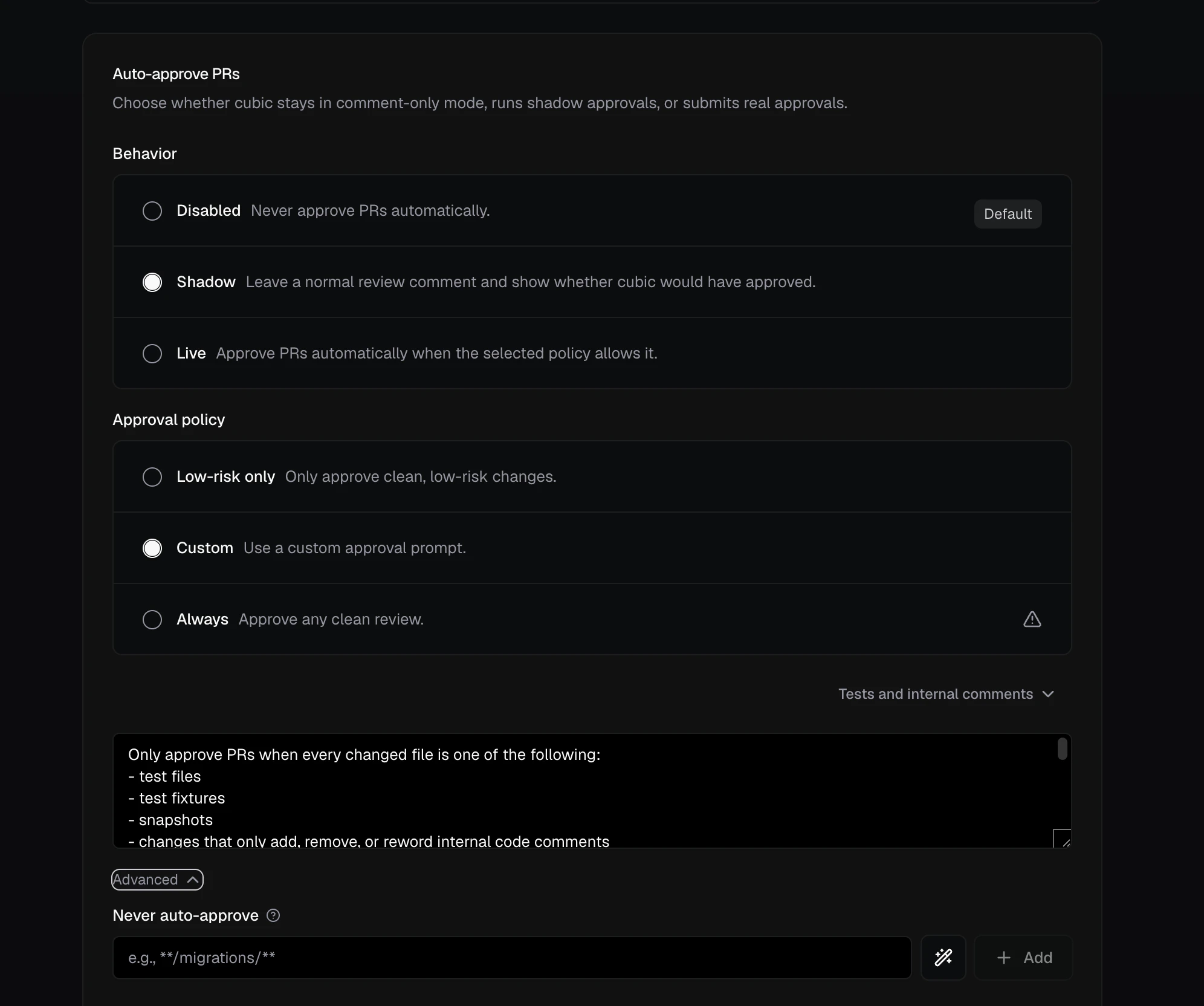 ## How it works
cubic treats auto-approval as part of the review outcome. If the review is clean and your settings allow approval, cubic can approve the PR. If the PR does not match your policy, cubic does not approve it.
cubic also checks again when someone dismisses the last issue that blocks approval, so the PR does not wait for another push. See [Dismissed issues](#dismissed-issues).
Shadow mode is the safe way to start. It keeps cubic in comment-only mode, but adds a summary showing whether cubic would have approved the PR.
## Recommended workflow
Start with repositories where the risk is low, such as documentation, internal tools, test fixtures, or repos with narrow change types. Auto-approval settings are configured per repository, so you do not need to roll it out everywhere at once.
1. Open [AI review settings](https://www.cubic.dev/ai-review?tab=auto-approve) and select one repository.
2. Set **Behavior** to **Shadow**.
3. Choose **Low-risk only** or write a **Custom** policy for that repository.
4. Watch a few real PRs to see which ones cubic would approve.
5. Add never-auto-approve rules for sensitive paths, such as migrations or infrastructure, and for PR attributes such as authors or labels.
6. Switch **Behavior** to **Live** when the shadow results match your team's expectations.
Use different policies for different repositories. A docs repo might use live auto-approval much
sooner than a payments, auth, or infrastructure repo.
## Behavior and policy
Behavior controls whether cubic submits real approvals:
* **Disabled:** cubic only comments.
* **Shadow:** cubic comments and shows what it would have approved.
* **Live:** cubic submits a real GitHub approval when the policy allows it.
Approval policy controls which clean PRs are eligible:
* **Low-risk only:** recommended default for most repositories.
* **Custom:** your own approval criteria, such as "only approve tests and docs."
* **Always:** approves any clean review. Use this only for repositories where that is acceptable.
### Custom policy
The custom policy allows you to provide your own prompt for the auto-approval agent. When you select this option, cubic will first give you the prompt it uses for the low-risk policy. You can then edit the prompt to adapt it to your needs.
The custom policy only runs when no open cubic issues block approval. By default every open issue blocks; [Allow open issues](#allow-open-issues) lets issues at the priorities you choose stay open. If cubic finds issues in the first commit of the PR, but those issues are resolved in the next commit, the custom policy will run. It also runs when someone dismisses the last blocking issue.
The custom approval agent receives the following context:
| Context | What cubic provides |
| - | - |
| PR details | The title, author, description, total number of changed files, and total number of changed lines. |
| Current changes | Available diff patches with each file's name, status, additions, and deletions. Large descriptions and diffs may be truncated to fit the evaluation context. |
| Earlier decisions | On later reviews, the previous approval decision and the changes since that decision, when available. The agent still makes a fresh decision from the current PR diff. |
| Open issues | Open cubic issues that [Allow open issues](#allow-open-issues) lets through, with each issue's priority, location, and summary. |
| Dismissed issues | cubic issues that someone resolved or disputed without a fix cubic detected, with each issue's priority, location, summary, and latest reply, if any. A reply may dispute the issue, say it was fixed, or defer it. The agent treats each dismissal and reply as a claim to check against the diff. See [Dismissed issues](#dismissed-issues). |
## Allow open issues
By default, any open cubic issue blocks auto-approval. **Allow open issues** lets a repository approve PRs while issues at the priorities you choose stay open. Pick the priorities in the dropdown; picking one also picks every lower priority, so choosing **P2** allows P2 and P3. Nothing is selected by default.
| Open issues on the PR | Setting | Result |
| - | - | - |
| This review finds a P3 | None | Comment only |
| This review finds a P3 | P3 | Findings review, then a separate approval |
| This review finds a P2 and a P3 | P3 | Comment only |
| This review finds a P0 | All | Findings review, then a separate approval |
| No new issues; a P3 from an earlier push is still open | P3 | Approval |
| An issue has no recorded priority | Any except All | Comment only |
* Priority is the P0–P3 label on each cubic comment.
* Only findings cubic posts count. Findings dropped by the inline comment limit never block approval.
* When new issues are allowed, cubic posts its findings as a normal review, then submits the approval as a separate review.
* Every other rule still applies: behavior, approval policy, never-auto-approve and only-auto-approve rules, and external contributors. With **Low-risk only** or **Custom**, the approval agent sees the open issues and still makes its own decision.
In `cubic.yaml`, set `reviews.auto_approve_rules.allow_open_issues` to `none`, `p3`, `p2_and_p3`, `p1_to_p3`, or `all`.
## Dismissed issues
A cubic issue stops blocking approval when a later commit fixes it, when someone resolves its review thread, or when someone disputes it by replying that it is wrong. These authors can dispute an issue by replying:
* A repository member.
* The pull request author.
* Anyone with write access to the repository.
* A GitHub App bot, such as a coding agent working on the pull request. The bot does not need to tag cubic.
cubic does not reply to a bot's dispute. If the dispute clears the last blocking issue and cubic checks approval again, it can still post the result in the thread, as described below. Only repository members teach it [learnings](/ai-review/memory-and-learning).
A pull request comment that tags cubic can dispute issues too, such as `@cubic-dev-ai the P3 about test coverage is out of scope for this PR`. cubic works out which open issues the comment disputes, dismisses them, and replies with links to their threads. When it can't tell which issue the comment means, cubic dismisses nothing and replies with a list of the open issues, so the author can reply in the right thread. cubic answers these comments from bots as well. The same authors can dismiss issues this way, and these comments never teach learnings.
When someone dismisses the last blocking issue, cubic checks approval again without waiting for another push. cubic waits about 10 seconds for further dismissals, then checks once.
Every other rule still applies: behavior, approval policy, never-auto-approve and only-auto-approve rules, and external contributors.
* With **Low-risk only** or **Custom**, the approval agent sees each dismissed issue and its latest reply. It checks the reply against the diff and can ask for human review when an issue still applies.
* With **Always**, cubic approves once no rule blocks approval, so resolving the last thread is enough to approve the PR.
If the last issue was disputed in a reply, cubic answers in that thread:
| Result | cubic's reply |
| - | - |
| Approved | Says cubic approved the PR. With [Allow open issues](#allow-open-issues), it also counts the issues left open. |
| A rule blocks approval | Names the rule. |
| The approval agent declines | Gives the agent's reason and asks for human review. |
cubic does not post an approval result when other issues still block approval, or when the last issue was dismissed by resolving its thread or by a pull request comment.
cubic checks again only when:
* **Behavior** is **Live**.
* cubic has reviewed the PR's latest commit. After a push, the review of that commit decides.
* No cubic review is running on the PR. A running review decides with the dismissals in place.
## Safety controls
Auto-approval is conservative by design:
* cubic only approves when no open review issues block it. By default, every open issue blocks approval.
* A resolved or disputed issue stops blocking approval. With **Low-risk only** or **Custom**, the approval agent still checks each dismissal against the diff. See [Dismissed issues](#dismissed-issues).
* Shadow mode never submits a real approval.
* Never-auto-approve rules block approval when a PR changes sensitive files or matches a PR attribute rule.
* Changed-file allowlists restrict approval to explicitly approved paths.
* By default, public-repository PRs from external contributors are reviewed but not auto-approved. The same applies when cubic can't confirm whether the author is an external contributor. This default applies to new settings; existing settings keep their saved value.
* Bots enabled in your team settings count as trusted authors for the external-contributor check. Their PRs still need to satisfy your approval policy and every other rule.
* GitHub branch protection still applies, including required checks, required reviewers, and code owner rules.
Use never-auto-approve rules for files that should always get human review, such as migrations, infrastructure, auth, billing, or production configuration. If any changed file in the PR matches one of those patterns, cubic does not approve the PR.
Use only-auto-approve file rules to start with a narrow set of trusted paths. Every changed path must match at least one configured glob. A PR that changes both `docs/**` and `cdk/**` does not qualify when the allowlist contains only `docs/**`. Renamed files must match on both their current and previous paths, and never-auto-approve rules always take precedence.
## Approval filters
Auto-approval can also filter on PR attributes: the author, the head or base branch, PR labels, and the PR title.
* **Never auto-approve when…** rules block approval when any rule matches. For example, exclude PRs labeled `do-not-auto-approve` or titled `WIP:*`.
* **Only auto-approve when…** rules are allowlists. Once an attribute has rules, PRs must match one of them. For example, only auto-approve PRs from `renovate[bot]` or `dependabot[bot]` that target `main`.
Authors, branches, and titles support glob patterns; labels match exactly, ignoring case. If cubic cannot verify a PR's metadata, it does not approve the PR.
Configure these settings in [AI review settings](https://www.cubic.dev/ai-review?tab=auto-approve), or version-control them with [`cubic.yaml`](/configure/cubic-yaml).
## Next steps
* [AI review settings](https://www.cubic.dev/ai-review?tab=auto-approve): Configure auto-approval in the dashboard.
* [Configure with cubic.yaml](/configure/cubic-yaml): Version-control auto-approval settings.
This documentation is built and hosted on [Mintlify](https://mintlify.com), a developer documentation platform.
## How it works
cubic treats auto-approval as part of the review outcome. If the review is clean and your settings allow approval, cubic can approve the PR. If the PR does not match your policy, cubic does not approve it.
cubic also checks again when someone dismisses the last issue that blocks approval, so the PR does not wait for another push. See [Dismissed issues](#dismissed-issues).
Shadow mode is the safe way to start. It keeps cubic in comment-only mode, but adds a summary showing whether cubic would have approved the PR.
## Recommended workflow
Start with repositories where the risk is low, such as documentation, internal tools, test fixtures, or repos with narrow change types. Auto-approval settings are configured per repository, so you do not need to roll it out everywhere at once.
1. Open [AI review settings](https://www.cubic.dev/ai-review?tab=auto-approve) and select one repository.
2. Set **Behavior** to **Shadow**.
3. Choose **Low-risk only** or write a **Custom** policy for that repository.
4. Watch a few real PRs to see which ones cubic would approve.
5. Add never-auto-approve rules for sensitive paths, such as migrations or infrastructure, and for PR attributes such as authors or labels.
6. Switch **Behavior** to **Live** when the shadow results match your team's expectations.
Use different policies for different repositories. A docs repo might use live auto-approval much
sooner than a payments, auth, or infrastructure repo.
## Behavior and policy
Behavior controls whether cubic submits real approvals:
* **Disabled:** cubic only comments.
* **Shadow:** cubic comments and shows what it would have approved.
* **Live:** cubic submits a real GitHub approval when the policy allows it.
Approval policy controls which clean PRs are eligible:
* **Low-risk only:** recommended default for most repositories.
* **Custom:** your own approval criteria, such as "only approve tests and docs."
* **Always:** approves any clean review. Use this only for repositories where that is acceptable.
### Custom policy
The custom policy allows you to provide your own prompt for the auto-approval agent. When you select this option, cubic will first give you the prompt it uses for the low-risk policy. You can then edit the prompt to adapt it to your needs.
The custom policy only runs when no open cubic issues block approval. By default every open issue blocks; [Allow open issues](#allow-open-issues) lets issues at the priorities you choose stay open. If cubic finds issues in the first commit of the PR, but those issues are resolved in the next commit, the custom policy will run. It also runs when someone dismisses the last blocking issue.
The custom approval agent receives the following context:
| Context | What cubic provides |
| - | - |
| PR details | The title, author, description, total number of changed files, and total number of changed lines. |
| Current changes | Available diff patches with each file's name, status, additions, and deletions. Large descriptions and diffs may be truncated to fit the evaluation context. |
| Earlier decisions | On later reviews, the previous approval decision and the changes since that decision, when available. The agent still makes a fresh decision from the current PR diff. |
| Open issues | Open cubic issues that [Allow open issues](#allow-open-issues) lets through, with each issue's priority, location, and summary. |
| Dismissed issues | cubic issues that someone resolved or disputed without a fix cubic detected, with each issue's priority, location, summary, and latest reply, if any. A reply may dispute the issue, say it was fixed, or defer it. The agent treats each dismissal and reply as a claim to check against the diff. See [Dismissed issues](#dismissed-issues). |
## Allow open issues
By default, any open cubic issue blocks auto-approval. **Allow open issues** lets a repository approve PRs while issues at the priorities you choose stay open. Pick the priorities in the dropdown; picking one also picks every lower priority, so choosing **P2** allows P2 and P3. Nothing is selected by default.
| Open issues on the PR | Setting | Result |
| - | - | - |
| This review finds a P3 | None | Comment only |
| This review finds a P3 | P3 | Findings review, then a separate approval |
| This review finds a P2 and a P3 | P3 | Comment only |
| This review finds a P0 | All | Findings review, then a separate approval |
| No new issues; a P3 from an earlier push is still open | P3 | Approval |
| An issue has no recorded priority | Any except All | Comment only |
* Priority is the P0–P3 label on each cubic comment.
* Only findings cubic posts count. Findings dropped by the inline comment limit never block approval.
* When new issues are allowed, cubic posts its findings as a normal review, then submits the approval as a separate review.
* Every other rule still applies: behavior, approval policy, never-auto-approve and only-auto-approve rules, and external contributors. With **Low-risk only** or **Custom**, the approval agent sees the open issues and still makes its own decision.
In `cubic.yaml`, set `reviews.auto_approve_rules.allow_open_issues` to `none`, `p3`, `p2_and_p3`, `p1_to_p3`, or `all`.
## Dismissed issues
A cubic issue stops blocking approval when a later commit fixes it, when someone resolves its review thread, or when someone disputes it by replying that it is wrong. These authors can dispute an issue by replying:
* A repository member.
* The pull request author.
* Anyone with write access to the repository.
* A GitHub App bot, such as a coding agent working on the pull request. The bot does not need to tag cubic.
cubic does not reply to a bot's dispute. If the dispute clears the last blocking issue and cubic checks approval again, it can still post the result in the thread, as described below. Only repository members teach it [learnings](/ai-review/memory-and-learning).
A pull request comment that tags cubic can dispute issues too, such as `@cubic-dev-ai the P3 about test coverage is out of scope for this PR`. cubic works out which open issues the comment disputes, dismisses them, and replies with links to their threads. When it can't tell which issue the comment means, cubic dismisses nothing and replies with a list of the open issues, so the author can reply in the right thread. cubic answers these comments from bots as well. The same authors can dismiss issues this way, and these comments never teach learnings.
When someone dismisses the last blocking issue, cubic checks approval again without waiting for another push. cubic waits about 10 seconds for further dismissals, then checks once.
Every other rule still applies: behavior, approval policy, never-auto-approve and only-auto-approve rules, and external contributors.
* With **Low-risk only** or **Custom**, the approval agent sees each dismissed issue and its latest reply. It checks the reply against the diff and can ask for human review when an issue still applies.
* With **Always**, cubic approves once no rule blocks approval, so resolving the last thread is enough to approve the PR.
If the last issue was disputed in a reply, cubic answers in that thread:
| Result | cubic's reply |
| - | - |
| Approved | Says cubic approved the PR. With [Allow open issues](#allow-open-issues), it also counts the issues left open. |
| A rule blocks approval | Names the rule. |
| The approval agent declines | Gives the agent's reason and asks for human review. |
cubic does not post an approval result when other issues still block approval, or when the last issue was dismissed by resolving its thread or by a pull request comment.
cubic checks again only when:
* **Behavior** is **Live**.
* cubic has reviewed the PR's latest commit. After a push, the review of that commit decides.
* No cubic review is running on the PR. A running review decides with the dismissals in place.
## Safety controls
Auto-approval is conservative by design:
* cubic only approves when no open review issues block it. By default, every open issue blocks approval.
* A resolved or disputed issue stops blocking approval. With **Low-risk only** or **Custom**, the approval agent still checks each dismissal against the diff. See [Dismissed issues](#dismissed-issues).
* Shadow mode never submits a real approval.
* Never-auto-approve rules block approval when a PR changes sensitive files or matches a PR attribute rule.
* Changed-file allowlists restrict approval to explicitly approved paths.
* By default, public-repository PRs from external contributors are reviewed but not auto-approved. The same applies when cubic can't confirm whether the author is an external contributor. This default applies to new settings; existing settings keep their saved value.
* Bots enabled in your team settings count as trusted authors for the external-contributor check. Their PRs still need to satisfy your approval policy and every other rule.
* GitHub branch protection still applies, including required checks, required reviewers, and code owner rules.
Use never-auto-approve rules for files that should always get human review, such as migrations, infrastructure, auth, billing, or production configuration. If any changed file in the PR matches one of those patterns, cubic does not approve the PR.
Use only-auto-approve file rules to start with a narrow set of trusted paths. Every changed path must match at least one configured glob. A PR that changes both `docs/**` and `cdk/**` does not qualify when the allowlist contains only `docs/**`. Renamed files must match on both their current and previous paths, and never-auto-approve rules always take precedence.
## Approval filters
Auto-approval can also filter on PR attributes: the author, the head or base branch, PR labels, and the PR title.
* **Never auto-approve when…** rules block approval when any rule matches. For example, exclude PRs labeled `do-not-auto-approve` or titled `WIP:*`.
* **Only auto-approve when…** rules are allowlists. Once an attribute has rules, PRs must match one of them. For example, only auto-approve PRs from `renovate[bot]` or `dependabot[bot]` that target `main`.
Authors, branches, and titles support glob patterns; labels match exactly, ignoring case. If cubic cannot verify a PR's metadata, it does not approve the PR.
Configure these settings in [AI review settings](https://www.cubic.dev/ai-review?tab=auto-approve), or version-control them with [`cubic.yaml`](/configure/cubic-yaml).
## Next steps
* [AI review settings](https://www.cubic.dev/ai-review?tab=auto-approve): Configure auto-approval in the dashboard.
* [Configure with cubic.yaml](/configure/cubic-yaml): Version-control auto-approval settings.
This documentation is built and hosted on [Mintlify](https://mintlify.com), a developer documentation platform.