> ## Documentation Index
> Fetch the complete documentation index at: https://docs.cubic.dev/llms.txt
> Use this file to discover all available pages before exploring further.
# Auto-fix
> Let cubic fix the issues it finds in your pull requests
cubic can automatically fix the issues from its review. It checks each issue, pushes fixes for the real ones to your pull request, and replies on every thread.
Instead of copying the **Prompt for AI agents** into your own coding agent, let cubic do the work. You only need to answer the questions it can't decide alone.
Auto-fix is in beta. Paid plans and trials include an allowance of auto-fix pull
requests. See [Limits](#limits).
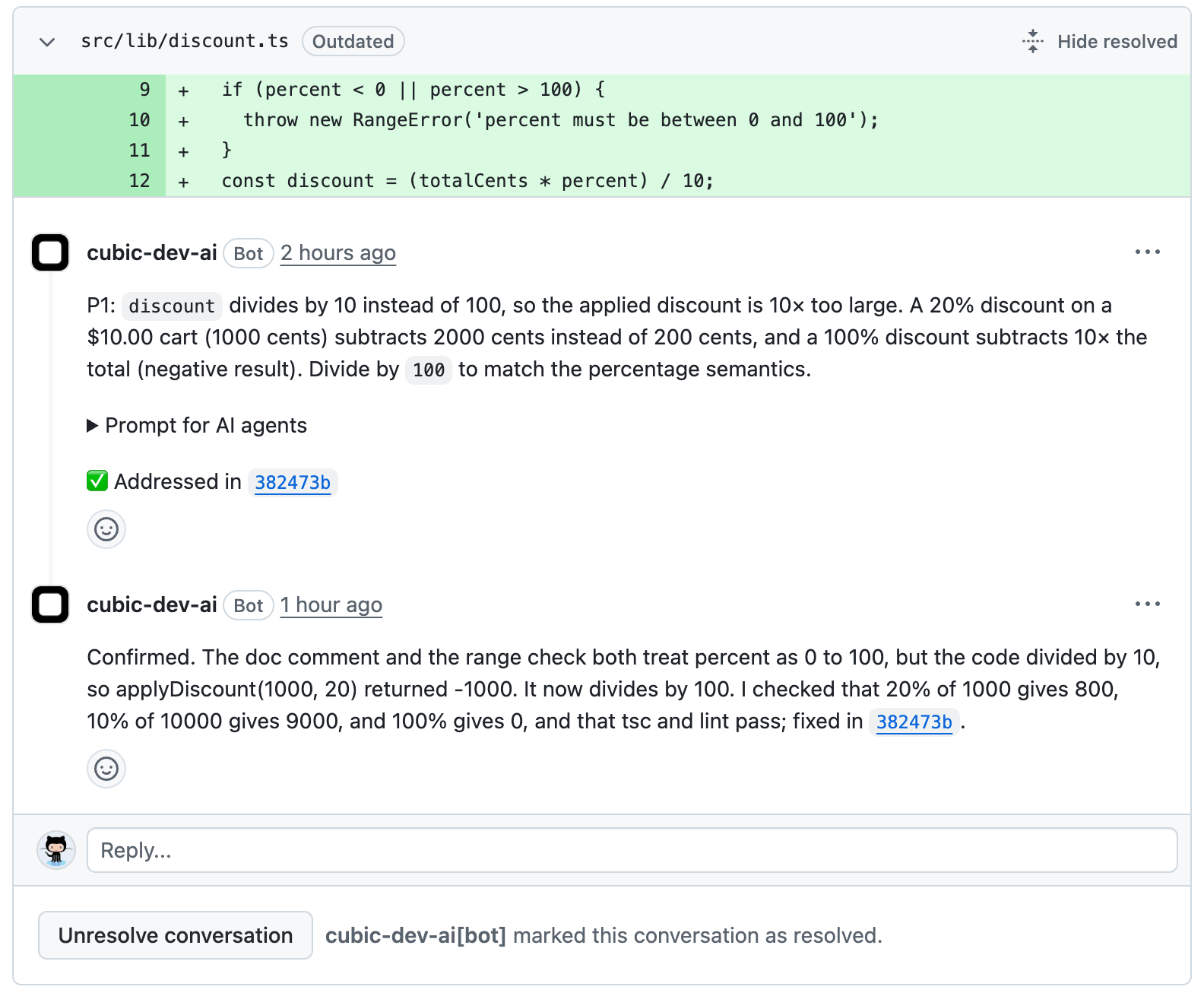 ## How it works
When cubic finishes reviewing your pull request, auto-fix:
1. **Checks each issue** - Reads the code to see if the issue is real
2. **Fixes the real ones** - Makes the change and runs your lint, type-check, and tests where it can
3. **Pushes the fix** - Commits to your PR branch
4. **Replies on each thread** - Explains what it decided and resolves the thread when it's done
With more than 10 issues, auto-fix works in batches of 10. Each batch's fixes and replies reach your pull request before it starts the next, and the run's progress comment counts the issues done so far.
Each push gets a new review. Auto-fix keeps going until a review finds no open issues. This needs automatic reviews of new commits, which are on unless `cubic.yaml` sets `reviews.incremental_commits: false`.
## How it works
When cubic finishes reviewing your pull request, auto-fix:
1. **Checks each issue** - Reads the code to see if the issue is real
2. **Fixes the real ones** - Makes the change and runs your lint, type-check, and tests where it can
3. **Pushes the fix** - Commits to your PR branch
4. **Replies on each thread** - Explains what it decided and resolves the thread when it's done
With more than 10 issues, auto-fix works in batches of 10. Each batch's fixes and replies reach your pull request before it starts the next, and the run's progress comment counts the issues done so far.
Each push gets a new review. Auto-fix keeps going until a review finds no open issues. This needs automatic reviews of new commits, which are on unless `cubic.yaml` sets `reviews.incremental_commits: false`.
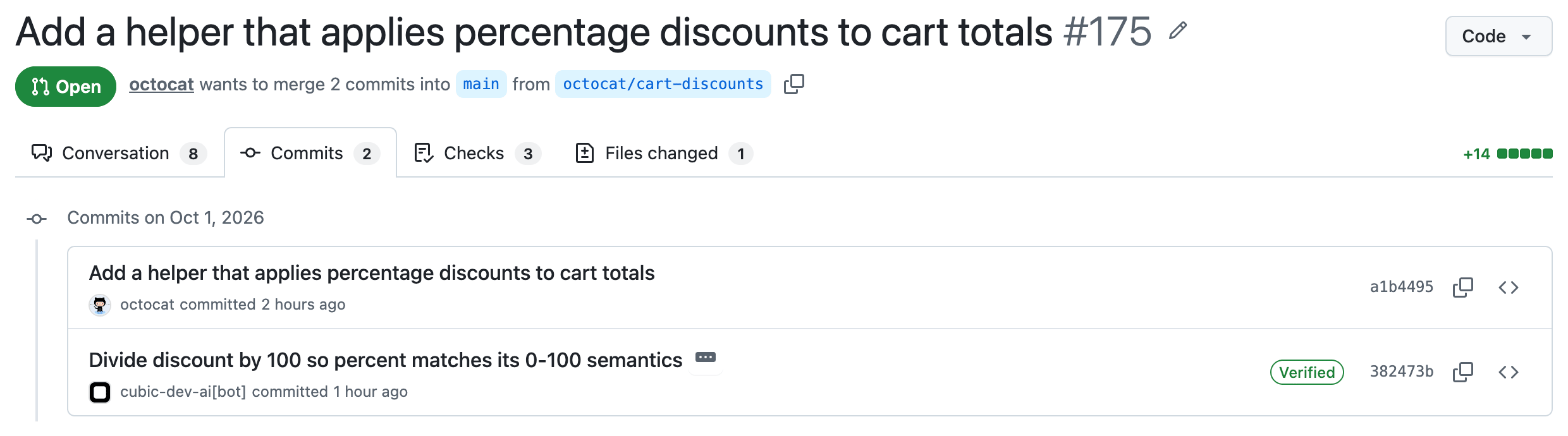 ## What cubic replies
Each reply starts with cubic's decision:
| Reply starts with | Meaning | Thread |
| - | - | - |
| **Confirmed.** | The issue is real. cubic fixed it and names the commit. | Resolved |
| **Not an issue.** | The issue doesn't hold, or the change isn't worth the risk. | Resolved |
| **Already fixed.** | A later commit fixed it. | Resolved |
| **No longer applies.** | The code it flagged is gone. | Resolved |
| **Needs your input.** | It needs a decision from you. cubic asks a question. | Open |
Want a say before it runs? Reply on the thread. If you have write access, cubic follows your reply. For example, "leave it" means cubic won't change the code.
## Turn on auto-fix for a pull request
Anyone with write access to the repository can turn auto-fix on or off from:
* **GitHub** - Click **Turn on auto-fix** in the footer of cubic's review
* **PR description** - Click the **Auto-fix** switch next to **View guided diff**
* **cubic** - Use the **Auto-fix** switch on the PR page
* **Slack** - Click **Enable auto-fix** on cubic's review message
* **MCP** - Ask your coding agent to call `set_pr_auto_fix` on the [cubic MCP server](/ide/mcp-server)
## What cubic replies
Each reply starts with cubic's decision:
| Reply starts with | Meaning | Thread |
| - | - | - |
| **Confirmed.** | The issue is real. cubic fixed it and names the commit. | Resolved |
| **Not an issue.** | The issue doesn't hold, or the change isn't worth the risk. | Resolved |
| **Already fixed.** | A later commit fixed it. | Resolved |
| **No longer applies.** | The code it flagged is gone. | Resolved |
| **Needs your input.** | It needs a decision from you. cubic asks a question. | Open |
Want a say before it runs? Reply on the thread. If you have write access, cubic follows your reply. For example, "leave it" means cubic won't change the code.
## Turn on auto-fix for a pull request
Anyone with write access to the repository can turn auto-fix on or off from:
* **GitHub** - Click **Turn on auto-fix** in the footer of cubic's review
* **PR description** - Click the **Auto-fix** switch next to **View guided diff**
* **cubic** - Use the **Auto-fix** switch on the PR page
* **Slack** - Click **Enable auto-fix** on cubic's review message
* **MCP** - Ask your coding agent to call `set_pr_auto_fix` on the [cubic MCP server](/ide/mcp-server)
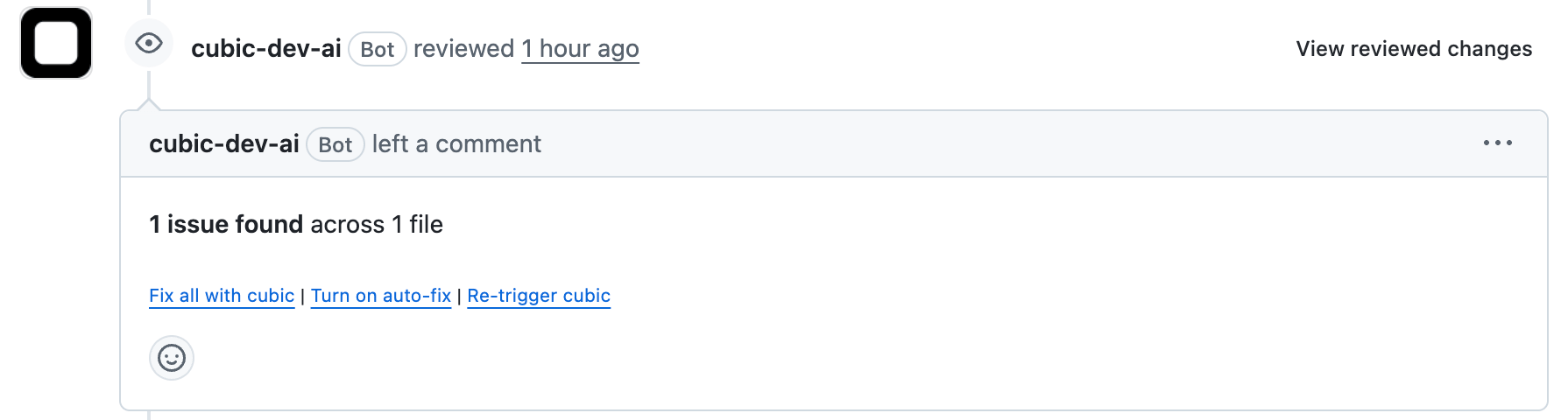 Auto-fix starts right away on any open issues. cubic commits the fixes as its own GitHub app, not as the person who turned it on.
## Turn on auto-fix for a repository
Admins and members can set auto-fix for a repository in [AI review → Auto-fix](https://www.cubic.dev/ai-review?tab=auto-fix):
* **Off** - Auto-fix isn't available
* **On demand** (default) - Someone turns it on for each pull request
* **On** - Auto-fix turns on for every pull request that matches your rules. People can still turn it off on a pull request
Auto-fix starts right away on any open issues. cubic commits the fixes as its own GitHub app, not as the person who turned it on.
## Turn on auto-fix for a repository
Admins and members can set auto-fix for a repository in [AI review → Auto-fix](https://www.cubic.dev/ai-review?tab=auto-fix):
* **Off** - Auto-fix isn't available
* **On demand** (default) - Someone turns it on for each pull request
* **On** - Auto-fix turns on for every pull request that matches your rules. People can still turn it off on a pull request
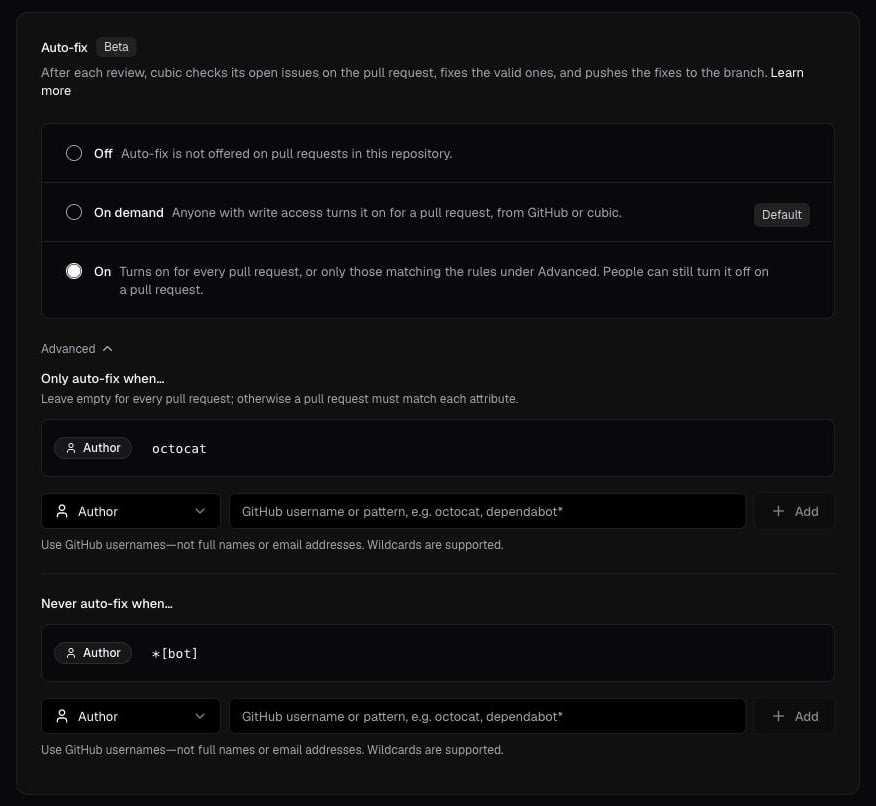 ### Rules
When auto-fix is **On**, rules under **Advanced** pick which pull requests get auto-fix:
* **Only auto-fix when…** - A pull request must match each of these. For example, an **Author** rule with your GitHub username runs auto-fix on your pull requests only
* **Never auto-fix when…** - Any match skips the pull request. For example, skip `*[bot]` authors or PRs with a `no-auto-fix` label
Rules can match the author, label, title, head branch, or base branch. They only decide whether auto-fix starts. Once it's on, turn it off on the pull request.
You can also set the mode and rules in [cubic.yaml](/configure/cubic-yaml), under `issues`. `auto_fix_rules` takes the same PR keys as `auto_approve_rules`: `only_` or `exclude_` followed by `authors`, `labels`, `titles`, `head_branches`, or `base_branches`.
```yaml theme={null}
issues:
auto_fix: on # off | on_demand | on
auto_fix_rules:
only_authors:
- alice
exclude_labels:
- no-auto-fix
```
If a rule in `cubic.yaml` has a whitespace-only list item, a value longer than 256 characters after trimming, or an empty `only_` list, cubic ignores all the rules and keeps auto-fix **On demand** until you fix them, or **Off** if the file sets `auto_fix: off`. An empty-string item (such as `""`) invalidates the entire YAML file and falls back to UI settings, which may still have auto-fix **On**.
## Follow a run
Each run opens as a fix session in [Fixes](https://www.cubic.dev/code/fix). You can watch the agent work and see what it fixed. You can't send it messages.
### Rules
When auto-fix is **On**, rules under **Advanced** pick which pull requests get auto-fix:
* **Only auto-fix when…** - A pull request must match each of these. For example, an **Author** rule with your GitHub username runs auto-fix on your pull requests only
* **Never auto-fix when…** - Any match skips the pull request. For example, skip `*[bot]` authors or PRs with a `no-auto-fix` label
Rules can match the author, label, title, head branch, or base branch. They only decide whether auto-fix starts. Once it's on, turn it off on the pull request.
You can also set the mode and rules in [cubic.yaml](/configure/cubic-yaml), under `issues`. `auto_fix_rules` takes the same PR keys as `auto_approve_rules`: `only_` or `exclude_` followed by `authors`, `labels`, `titles`, `head_branches`, or `base_branches`.
```yaml theme={null}
issues:
auto_fix: on # off | on_demand | on
auto_fix_rules:
only_authors:
- alice
exclude_labels:
- no-auto-fix
```
If a rule in `cubic.yaml` has a whitespace-only list item, a value longer than 256 characters after trimming, or an empty `only_` list, cubic ignores all the rules and keeps auto-fix **On demand** until you fix them, or **Off** if the file sets `auto_fix: off`. An empty-string item (such as `""`) invalidates the entire YAML file and falls back to UI settings, which may still have auto-fix **On**.
## Follow a run
Each run opens as a fix session in [Fixes](https://www.cubic.dev/code/fix). You can watch the agent work and see what it fixed. You can't send it messages.
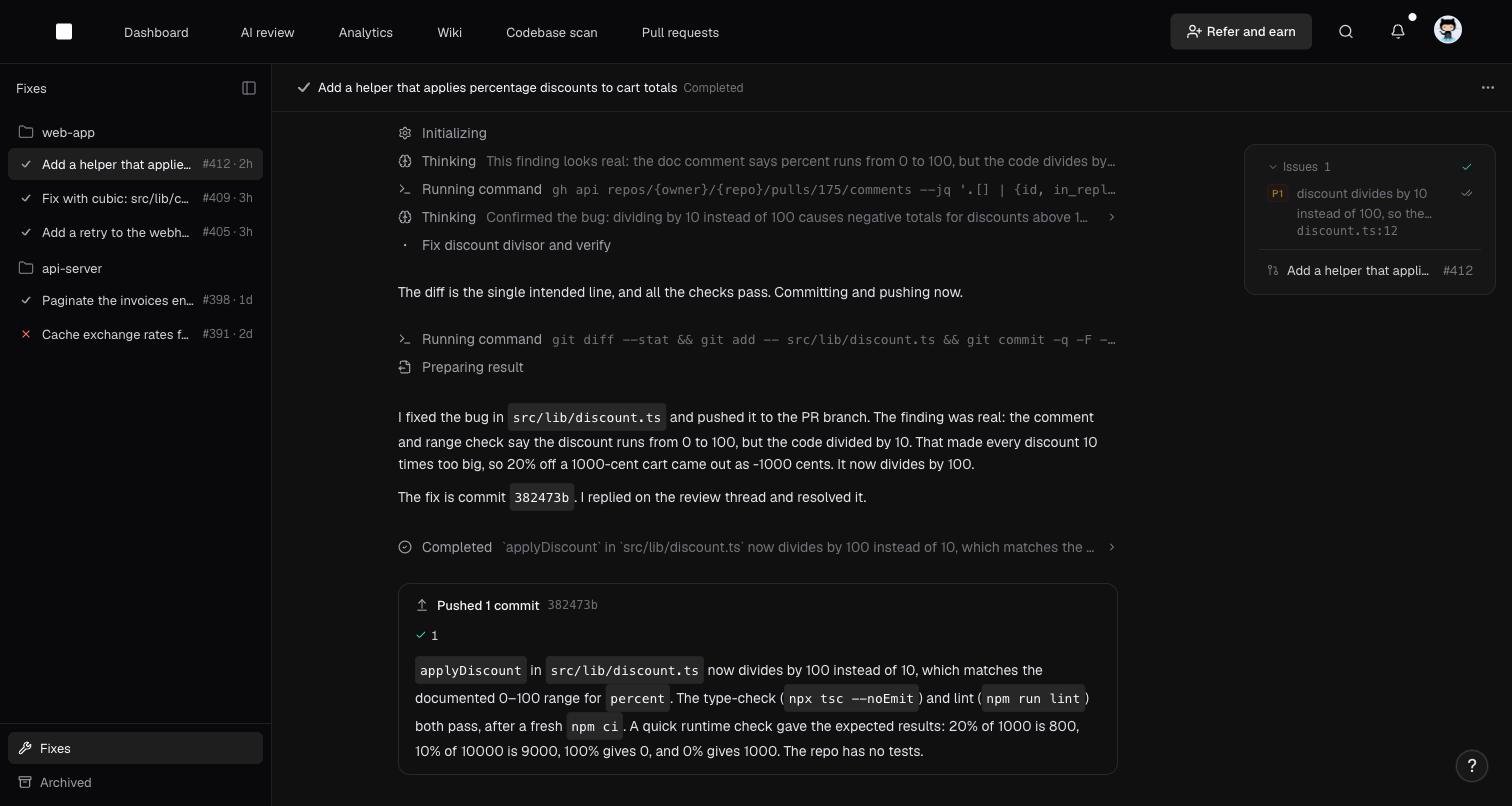 Open the session from:
* The **cubic · Auto-fix** check on the pull request
* cubic's comment on the pull request
* The cubic PR page
Click **Stop fix** to stop a run, or **Retry fix** to rerun a failed one.
## Stop auto-fix
* **Turn it off** - From any place you can turn it on. A run in progress finishes first
* **Push your own commits** - cubic stops the current run and picks up again after the next review
* **Close or merge the pull request** - Auto-fix turns off, and the pull request's fix sessions move to **Archived**
## Limits
Each organization can auto-fix a set number of pull requests per billing period, shared across its repositories:
| Plan | Auto-fix pull requests per billing period |
| - | - |
| Free and open source | Not included |
| Trial | 2 per seat, up to 50 |
| Team | 2 per seat |
| Pro | 10 per seat |
| Max | 20 per seat |
Paid plans reset monthly, including annual subscriptions. The trial allowance covers the whole trial and resets when it ends.
A pull request counts once per period, the first time auto-fix starts a run on it. Later runs, retries, and pushes on that pull request don't count again. Each pull request gets up to 10 auto-fix runs per period.
When your organization reaches its limit, auto-fix pauses on new pull requests until the period resets. Pull requests that already count keep running. The PR page shows why auto-fix paused and when it resumes. See your usage in [Settings → Usage](https://www.cubic.dev/settings?tab=usage).
## Tell cubic how to fix
cubic reads your repository's `AGENTS.md`. Keep general guidance for coding agents there.
For guidance just for cubic's fixes, like which issues are worth fixing in your codebase, add [coding agent instructions](/ai-review/coding-agents#coding-agent-instructions).
## Troubleshooting
* In [AI review → Auto-fix](https://www.cubic.dev/ai-review?tab=auto-fix), make sure the **Fix with cubic button** is on, the coding agent provider is **Default** (cubic), and auto-fix isn't **Off**
* Make sure you have write access to the repository
* Pull requests from forks aren't supported, because cubic can't push to them
* Check that the repository is set to **On** and the pull request matches your rules
* If someone turned auto-fix off on the pull request, it stays off there. Turn it back on from the pull request
* With label rules, auto-fix turns on after the first review, not when the PR opens
* Your organization used its auto-fix pull requests for the period, or the pull request used all its runs for the period. See [Limits](#limits)
* After the reset date shown on the PR page, auto-fix resumes at cubic's next review. To resume right away, click **retry** next to **paused** on the PR page
* After three failed runs in a row, auto-fix stops. Click **Retry fix** in the fix session or push a commit
* If you pushed commits, auto-fix picks up again after cubic reviews them
* Auto-fix doesn't revisit an issue it already decided, but you can still ask for a fix. Comment `@cubic fix this` on the thread, and cubic starts a [separate fix](/ai-review/coding-agents#tagging-cubic-in-github-or-cubic)
* For **Needs your input.**, tag cubic with your answer, for example `@cubic keep three retries and fix this`
This documentation is built and hosted on [Mintlify](https://mintlify.com), a developer documentation platform.
Open the session from:
* The **cubic · Auto-fix** check on the pull request
* cubic's comment on the pull request
* The cubic PR page
Click **Stop fix** to stop a run, or **Retry fix** to rerun a failed one.
## Stop auto-fix
* **Turn it off** - From any place you can turn it on. A run in progress finishes first
* **Push your own commits** - cubic stops the current run and picks up again after the next review
* **Close or merge the pull request** - Auto-fix turns off, and the pull request's fix sessions move to **Archived**
## Limits
Each organization can auto-fix a set number of pull requests per billing period, shared across its repositories:
| Plan | Auto-fix pull requests per billing period |
| - | - |
| Free and open source | Not included |
| Trial | 2 per seat, up to 50 |
| Team | 2 per seat |
| Pro | 10 per seat |
| Max | 20 per seat |
Paid plans reset monthly, including annual subscriptions. The trial allowance covers the whole trial and resets when it ends.
A pull request counts once per period, the first time auto-fix starts a run on it. Later runs, retries, and pushes on that pull request don't count again. Each pull request gets up to 10 auto-fix runs per period.
When your organization reaches its limit, auto-fix pauses on new pull requests until the period resets. Pull requests that already count keep running. The PR page shows why auto-fix paused and when it resumes. See your usage in [Settings → Usage](https://www.cubic.dev/settings?tab=usage).
## Tell cubic how to fix
cubic reads your repository's `AGENTS.md`. Keep general guidance for coding agents there.
For guidance just for cubic's fixes, like which issues are worth fixing in your codebase, add [coding agent instructions](/ai-review/coding-agents#coding-agent-instructions).
## Troubleshooting
* In [AI review → Auto-fix](https://www.cubic.dev/ai-review?tab=auto-fix), make sure the **Fix with cubic button** is on, the coding agent provider is **Default** (cubic), and auto-fix isn't **Off**
* Make sure you have write access to the repository
* Pull requests from forks aren't supported, because cubic can't push to them
* Check that the repository is set to **On** and the pull request matches your rules
* If someone turned auto-fix off on the pull request, it stays off there. Turn it back on from the pull request
* With label rules, auto-fix turns on after the first review, not when the PR opens
* Your organization used its auto-fix pull requests for the period, or the pull request used all its runs for the period. See [Limits](#limits)
* After the reset date shown on the PR page, auto-fix resumes at cubic's next review. To resume right away, click **retry** next to **paused** on the PR page
* After three failed runs in a row, auto-fix stops. Click **Retry fix** in the fix session or push a commit
* If you pushed commits, auto-fix picks up again after cubic reviews them
* Auto-fix doesn't revisit an issue it already decided, but you can still ask for a fix. Comment `@cubic fix this` on the thread, and cubic starts a [separate fix](/ai-review/coding-agents#tagging-cubic-in-github-or-cubic)
* For **Needs your input.**, tag cubic with your answer, for example `@cubic keep three retries and fix this`
This documentation is built and hosted on [Mintlify](https://mintlify.com), a developer documentation platform.