> ## Documentation Index
> Fetch the complete documentation index at: https://docs.cubic.dev/llms.txt
> Use this file to discover all available pages before exploring further.
# Coding agents
> Use Coding agents to asynchronously fix issues flagged in code review.
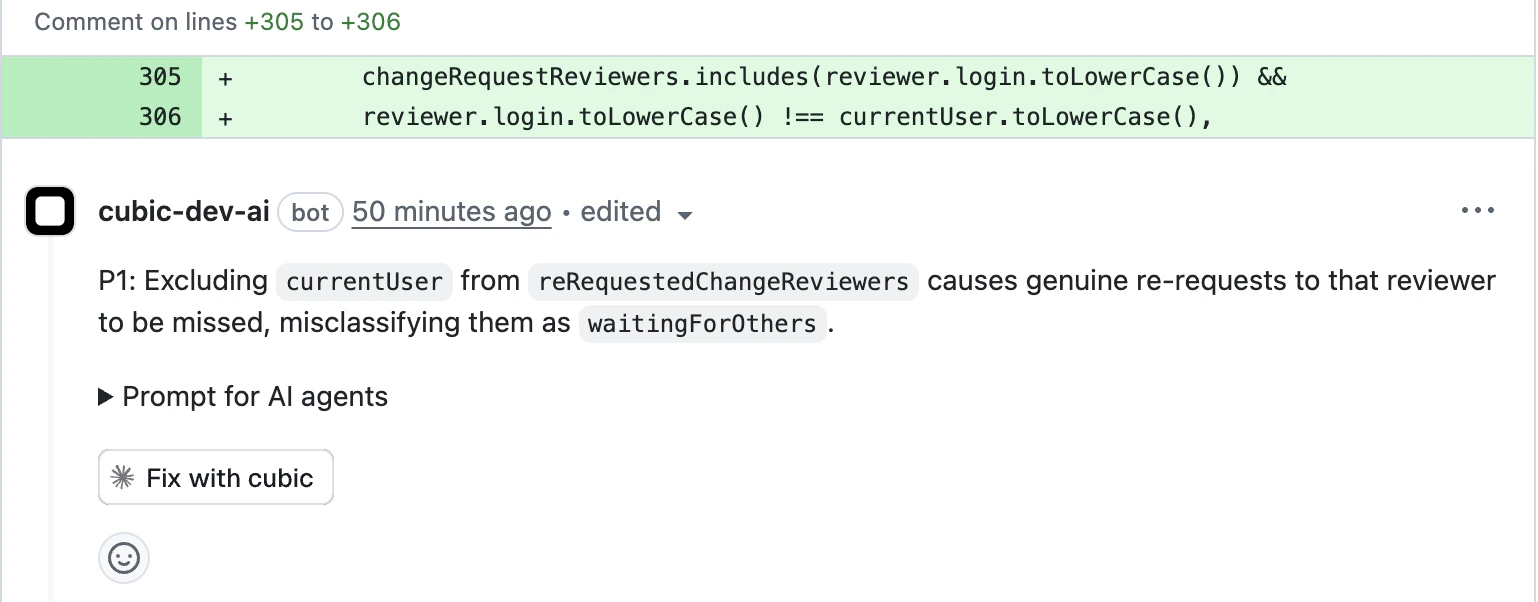
cubic can automatically fix issues identified during code review.
Request a targeted fix with one click, or turn on [auto-fix](/ai-review/auto-fix) to have cubic fix the issues from every review of a pull request.
 ## How it works
When cubic identifies an issue in your code, you can request an AI-generated fix that:
1. **Analyzes the issue** - Reviews the problem and relevant context
2. **Generates a solution** - Creates a targeted fix addressing the specific issue
3. **Applies the fix** - Pushes commits to your PR branch by default, or opens a fix PR when requested
4. **Preserves review flow** - Lets you review the changes before merging into your main PR
By default, cubic pushes commits directly to your PR branch. To override, include "open a fix PR"
in your request. If cubic opens a fix PR, it targets the branch of your original PR, not the main
branch.
## Triggering fixes
There are two ways to request an AI fix:
### Tagging cubic in Github or cubic
## How it works
When cubic identifies an issue in your code, you can request an AI-generated fix that:
1. **Analyzes the issue** - Reviews the problem and relevant context
2. **Generates a solution** - Creates a targeted fix addressing the specific issue
3. **Applies the fix** - Pushes commits to your PR branch by default, or opens a fix PR when requested
4. **Preserves review flow** - Lets you review the changes before merging into your main PR
By default, cubic pushes commits directly to your PR branch. To override, include "open a fix PR"
in your request. If cubic opens a fix PR, it targets the branch of your original PR, not the main
branch.
## Triggering fixes
There are two ways to request an AI fix:
### Tagging cubic in Github or cubic
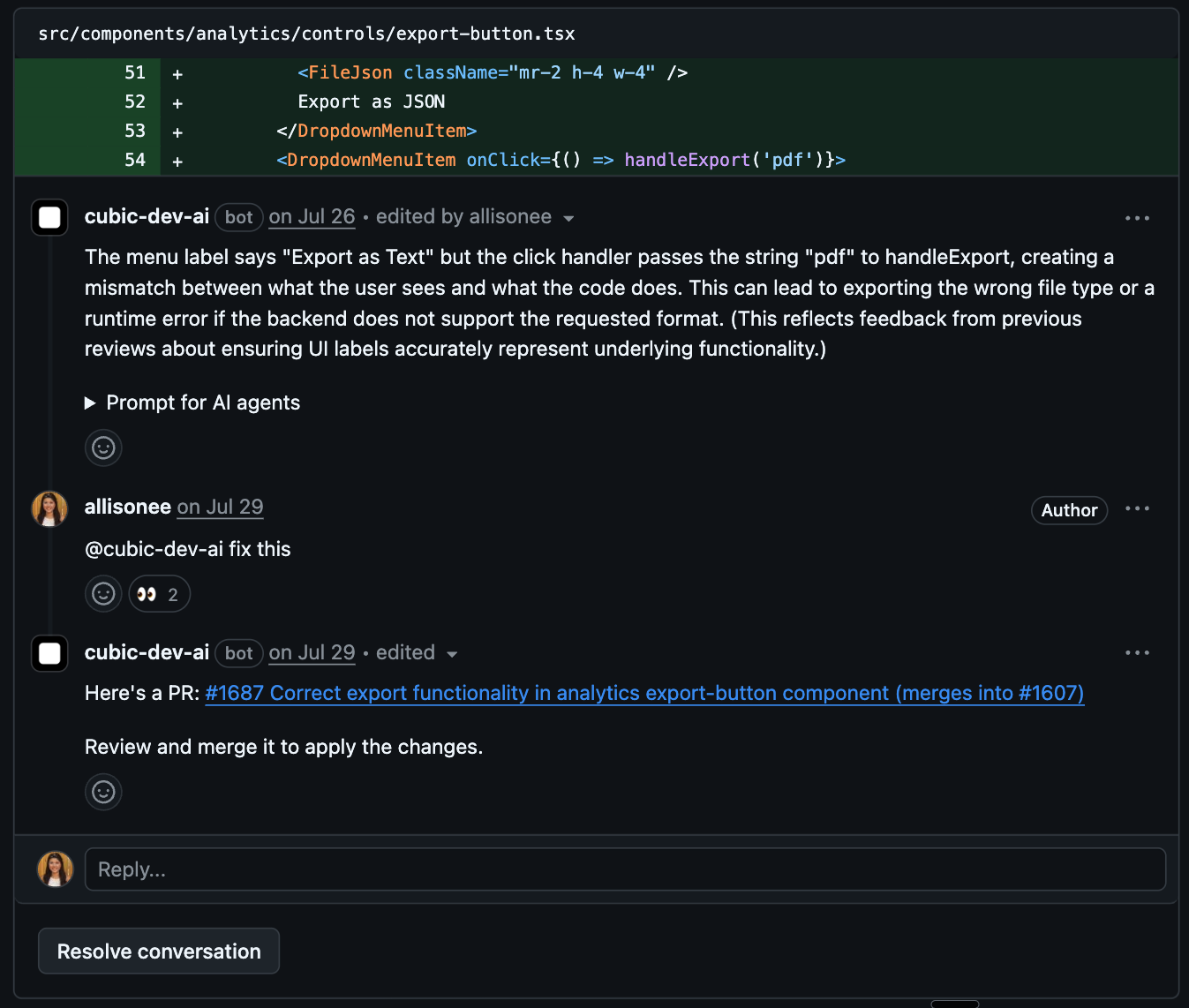 You can also request fixes for issues cubic didn’t flag. Tag cubic in any PR comment (including colleague comments) and ask for a fix:
* "@cubic fix this issue"
* "@cubic-dev-ai can you generate a fix for this?"
* "@cubic please fix the type error mentioned above"
cubic will acknowledge your request and begin generating the fix. If you want a separate PR instead
of direct commits, say "open a fix PR."
cubic only treats the current comment as permission to edit code when that comment explicitly tags
cubic. `@cubic`, `@cubic-dev-ai`, and other supported cubic tags work. Replying inside a
cubic-started thread without a fresh tag is treated as discussion, feedback, or questions, not
authorization to push changes.
### Using the fix button in cubic
For inline review comments, click the **Generate fix** button in the comment actions menu.
Dashboard-triggered fixes commit directly to the PR's branch by default.
This is available when:
* The comment identifies a specific issue in a file
* The comment includes file and line context
* Your installation has the fix feature enabled
## What to expect
### Fix generation process
1. **Acknowledgment** - cubic reacts with 👀 and comments
2. **Analysis** - The AI analyzes the issue and surrounding code
3. **Delivery** - cubic pushes commits to your PR branch by default, or opens a fix PR if requested. The fix runs in an
isolated sandbox in the background (typically 1-3 minutes).
4. **Notification** - cubic updates the original comment with the commit or PR details
### Follow a fix
Every run of cubic's coding agent opens as a fix session in cubic: runs started with **Fix with cubic**, **Fix all**, or **Generate fix**, auto-fix runs, requests made by tagging `@cubic` in a comment, and fixes from codebase scans. Fixes handed off to [Cursor cloud agents](#coding-agent-providers) don't open a fix session; you follow them in Cursor. **Fixes** in cubic code ([cubic.dev/code/fix](https://www.cubic.dev/code/fix)) lists your fix sessions, grouped by repository. cubic's comment on the pull request links to the run's fix session, where you can follow the agent's steps and see the result; a codebase-scan fix links to it from the scan. Click **Stop fix** to stop a run in progress.
Fix sessions are read-only. You can't send the agent follow-up requests or change its instructions while it runs. To ask for more changes, request a new fix or leave another `@cubic` comment.
Links to the old progress page open the run's fix session. Runs that finished before fix sessions were added don't have one, so their links show **Run not found**.
### Reviewing changes
If cubic opens a fix PR, it includes:
* **Descriptive title** - AI-generated title explaining what's being fixed
* **Targeted changes** - Only the code needed to address the specific issue
* **Original context** - Reference to the original PR and issue comment
* **Clean diff** - Easy to review changes in isolation
If a fix PR is created, you can test the changes locally by checking out the fix branch before
merging.
If cubic pushes commits directly, review the new commits on your PR branch as usual.
## Best practices
### Tips for using AI fixes
* **Review carefully** - Always review AI-generated code before merging
* **Test locally** - Verify the fix works as expected in your environment
### Limitations
* Complex architectural changes may require manual intervention
* Fixes are scoped to the specific issue identified
* Some issues may require broader refactoring beyond a single fix
* Follow-up changes are not yet supported
* Generated PRs or pushed commits run through your existing GitHub CI checks
## Coding agent providers
You can choose which coding agent applies fixes. cubic supports two providers:
* **Default (cubic)** - cubic's own coding agent generates and applies fixes. This works out of the box and needs no configuration.
* **Cursor cloud agents** - cubic hands off fixes to Cursor cloud agents running in your own Cursor account. This requires a one-time connection.
Set the provider per repository in **AI review → Auto-fix → Coding agent provider**.
### Connect Cursor cloud agents
Before you can select Cursor cloud agents, connect them in **Settings → Integrations → Cursor cloud agents**.
In Cursor, create an API key or a service account key. See Cursor's [API
documentation](https://cursor.com/docs/api#creating-api-keys) for how to create keys.
Open **Settings → Integrations → Cursor cloud agents**.
Choose the key type (**API key** or **Service account key**), paste the key (it starts with
`crsr_`), and save. cubic validates the key with Cursor and stores it encrypted.
In **AI review → Auto-fix → Coding agent provider**, choose **Cursor cloud agents**. cubic
now routes fixes for that repository to Cursor cloud agents.
Disconnecting Cursor cloud agents removes the stored key and switches any repositories using it
back to the default provider, cubic. You can reconnect at any time.
## Signed commits
cubic signs the commits it makes when it fixes issues, so GitHub marks them as **Verified** and
branches that require signed commits accept them. That covers the fixes it pushes to your branch
and the fix pull requests it opens. There is no setting to turn on.
Cursor cloud agents sign their own commits.
## Coding agent instructions
cubic reads your repository's `AGENTS.md`, like other coding agents. Keep general guidance there, such as how to run your tests.
Use coding agent instructions for guidance just for cubic's fixes. For example:
* **Judge issues your way** - "Logging issues in `scripts/` aren't worth fixing. These are one-off scripts", or "Missing input checks in `src/internal/` aren't issues. The gateway validates every request first"
* **Work around the sandbox** - "Skip `pnpm test:e2e`, it needs a browser. Run `pnpm test:unit` instead"
* **Explain with your sources** - "When an issue goes against a decision in `docs/adr/`, link that record in your reply"
Add them in [AI review → Auto-fix](https://www.cubic.dev/ai-review?tab=auto-fix) under **Coding agent instructions**, or in [cubic.yaml](/configure/cubic-yaml):
```yaml theme={null}
issues:
coding_agent_instructions: |
Logging issues in scripts/ aren't worth fixing. These are one-off scripts.
Skip pnpm test:e2e, it needs a browser. Run pnpm test:unit instead.
```
cubic follows them in every fix: **Fix with cubic**, [auto-fix](/ai-review/auto-fix), `@cubic` requests, and codebase scan fixes. They can be up to 10,000 characters.
Coding agent instructions apply only to the default cubic coding agent. Cursor cloud agents don't
receive them.
## Review the fix
Check the generated changes before merging. If cubic opened a separate fix PR, merge it into your original PR branch when you are satisfied with the changes.
This documentation is built and hosted on [Mintlify](https://mintlify.com), a developer documentation platform.
You can also request fixes for issues cubic didn’t flag. Tag cubic in any PR comment (including colleague comments) and ask for a fix:
* "@cubic fix this issue"
* "@cubic-dev-ai can you generate a fix for this?"
* "@cubic please fix the type error mentioned above"
cubic will acknowledge your request and begin generating the fix. If you want a separate PR instead
of direct commits, say "open a fix PR."
cubic only treats the current comment as permission to edit code when that comment explicitly tags
cubic. `@cubic`, `@cubic-dev-ai`, and other supported cubic tags work. Replying inside a
cubic-started thread without a fresh tag is treated as discussion, feedback, or questions, not
authorization to push changes.
### Using the fix button in cubic
For inline review comments, click the **Generate fix** button in the comment actions menu.
Dashboard-triggered fixes commit directly to the PR's branch by default.
This is available when:
* The comment identifies a specific issue in a file
* The comment includes file and line context
* Your installation has the fix feature enabled
## What to expect
### Fix generation process
1. **Acknowledgment** - cubic reacts with 👀 and comments
2. **Analysis** - The AI analyzes the issue and surrounding code
3. **Delivery** - cubic pushes commits to your PR branch by default, or opens a fix PR if requested. The fix runs in an
isolated sandbox in the background (typically 1-3 minutes).
4. **Notification** - cubic updates the original comment with the commit or PR details
### Follow a fix
Every run of cubic's coding agent opens as a fix session in cubic: runs started with **Fix with cubic**, **Fix all**, or **Generate fix**, auto-fix runs, requests made by tagging `@cubic` in a comment, and fixes from codebase scans. Fixes handed off to [Cursor cloud agents](#coding-agent-providers) don't open a fix session; you follow them in Cursor. **Fixes** in cubic code ([cubic.dev/code/fix](https://www.cubic.dev/code/fix)) lists your fix sessions, grouped by repository. cubic's comment on the pull request links to the run's fix session, where you can follow the agent's steps and see the result; a codebase-scan fix links to it from the scan. Click **Stop fix** to stop a run in progress.
Fix sessions are read-only. You can't send the agent follow-up requests or change its instructions while it runs. To ask for more changes, request a new fix or leave another `@cubic` comment.
Links to the old progress page open the run's fix session. Runs that finished before fix sessions were added don't have one, so their links show **Run not found**.
### Reviewing changes
If cubic opens a fix PR, it includes:
* **Descriptive title** - AI-generated title explaining what's being fixed
* **Targeted changes** - Only the code needed to address the specific issue
* **Original context** - Reference to the original PR and issue comment
* **Clean diff** - Easy to review changes in isolation
If a fix PR is created, you can test the changes locally by checking out the fix branch before
merging.
If cubic pushes commits directly, review the new commits on your PR branch as usual.
## Best practices
### Tips for using AI fixes
* **Review carefully** - Always review AI-generated code before merging
* **Test locally** - Verify the fix works as expected in your environment
### Limitations
* Complex architectural changes may require manual intervention
* Fixes are scoped to the specific issue identified
* Some issues may require broader refactoring beyond a single fix
* Follow-up changes are not yet supported
* Generated PRs or pushed commits run through your existing GitHub CI checks
## Coding agent providers
You can choose which coding agent applies fixes. cubic supports two providers:
* **Default (cubic)** - cubic's own coding agent generates and applies fixes. This works out of the box and needs no configuration.
* **Cursor cloud agents** - cubic hands off fixes to Cursor cloud agents running in your own Cursor account. This requires a one-time connection.
Set the provider per repository in **AI review → Auto-fix → Coding agent provider**.
### Connect Cursor cloud agents
Before you can select Cursor cloud agents, connect them in **Settings → Integrations → Cursor cloud agents**.
In Cursor, create an API key or a service account key. See Cursor's [API
documentation](https://cursor.com/docs/api#creating-api-keys) for how to create keys.
Open **Settings → Integrations → Cursor cloud agents**.
Choose the key type (**API key** or **Service account key**), paste the key (it starts with
`crsr_`), and save. cubic validates the key with Cursor and stores it encrypted.
In **AI review → Auto-fix → Coding agent provider**, choose **Cursor cloud agents**. cubic
now routes fixes for that repository to Cursor cloud agents.
Disconnecting Cursor cloud agents removes the stored key and switches any repositories using it
back to the default provider, cubic. You can reconnect at any time.
## Signed commits
cubic signs the commits it makes when it fixes issues, so GitHub marks them as **Verified** and
branches that require signed commits accept them. That covers the fixes it pushes to your branch
and the fix pull requests it opens. There is no setting to turn on.
Cursor cloud agents sign their own commits.
## Coding agent instructions
cubic reads your repository's `AGENTS.md`, like other coding agents. Keep general guidance there, such as how to run your tests.
Use coding agent instructions for guidance just for cubic's fixes. For example:
* **Judge issues your way** - "Logging issues in `scripts/` aren't worth fixing. These are one-off scripts", or "Missing input checks in `src/internal/` aren't issues. The gateway validates every request first"
* **Work around the sandbox** - "Skip `pnpm test:e2e`, it needs a browser. Run `pnpm test:unit` instead"
* **Explain with your sources** - "When an issue goes against a decision in `docs/adr/`, link that record in your reply"
Add them in [AI review → Auto-fix](https://www.cubic.dev/ai-review?tab=auto-fix) under **Coding agent instructions**, or in [cubic.yaml](/configure/cubic-yaml):
```yaml theme={null}
issues:
coding_agent_instructions: |
Logging issues in scripts/ aren't worth fixing. These are one-off scripts.
Skip pnpm test:e2e, it needs a browser. Run pnpm test:unit instead.
```
cubic follows them in every fix: **Fix with cubic**, [auto-fix](/ai-review/auto-fix), `@cubic` requests, and codebase scan fixes. They can be up to 10,000 characters.
Coding agent instructions apply only to the default cubic coding agent. Cursor cloud agents don't
receive them.
## Review the fix
Check the generated changes before merging. If cubic opened a separate fix PR, merge it into your original PR branch when you are satisfied with the changes.
This documentation is built and hosted on [Mintlify](https://mintlify.com), a developer documentation platform.