> ## Documentation Index
> Fetch the complete documentation index at: https://docs.cubic.dev/llms.txt
> Use this file to discover all available pages before exploring further.
# Pull request inbox
> Find reviews waiting on you and follow your PRs through to merge.
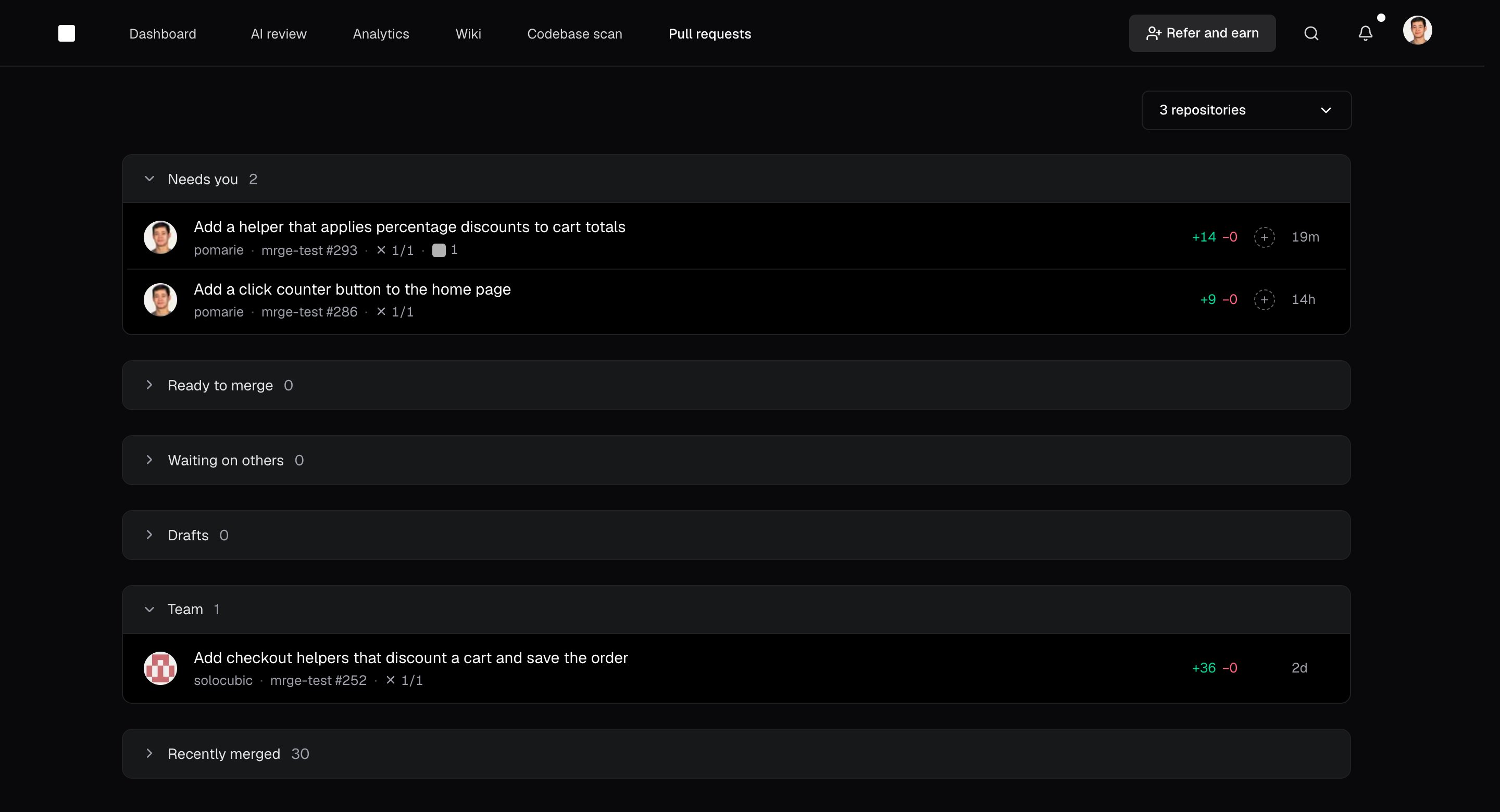
The [pull request inbox](https://www.cubic.dev/inbox) collects PRs from your selected repositories
and sorts them by who needs to act. What waits on you comes first, then your own PRs, then your
team's.
## Find what needs attention
The inbox lists PRs in these sections, from top to bottom:
| Section | What you'll find |
| - | - |
| **Needs you** | PRs waiting on your review, and your PRs with requested changes or failing checks. |
| **Ready to merge** | Your approved PRs with passing checks. |
| **Waiting on others** | Your PRs waiting on reviewers, cubic, or checks. |
| **Drafts** | Your draft PRs. |
| **Team** | Everyone else's open PRs that don't need your review. This section starts collapsed. |
| **Snoozed** | PRs you snoozed. This section starts collapsed and appears only when it has PRs. |
| **Recently merged** | PRs merged in the last 14 days. |
Select a section's header to collapse or expand it.
 Open a PR to [read the diff and submit your review](/code-review-platform/reviewing-prs).
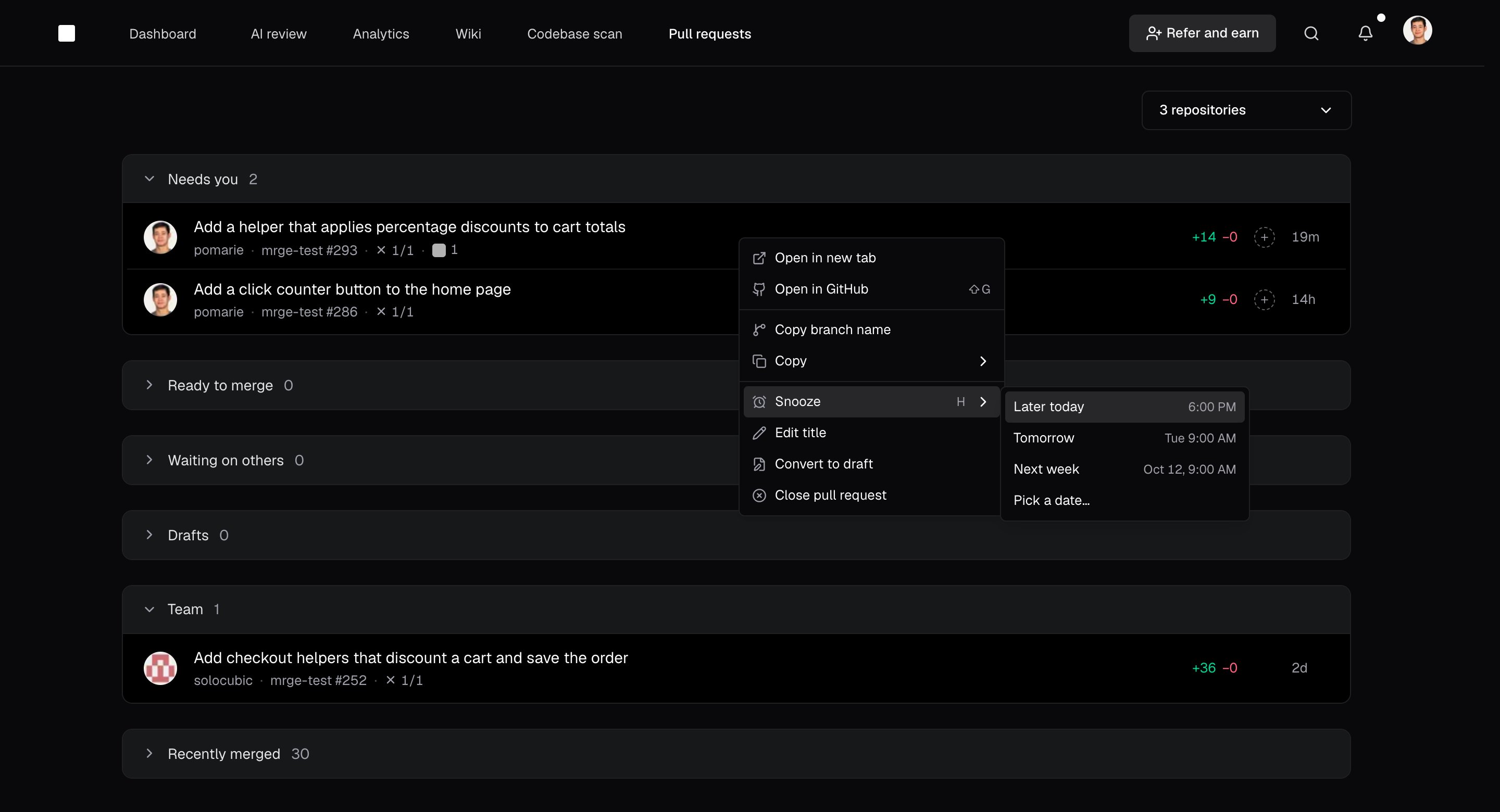
To merge a PR that's ready to merge without opening it, hover it and select **Merge**. Right-click
a PR to approve it, merge it, snooze it, or open it on GitHub.
Snooze a PR to set it aside until later today, tomorrow, next week (Monday morning), or a day you
pick. It waits in **Snoozed** and returns to its section at that time. To bring it back sooner,
right-click it and select **Unsnooze**.
Open a PR to [read the diff and submit your review](/code-review-platform/reviewing-prs).
To merge a PR that's ready to merge without opening it, hover it and select **Merge**. Right-click
a PR to approve it, merge it, snooze it, or open it on GitHub.
Snooze a PR to set it aside until later today, tomorrow, next week (Monday morning), or a day you
pick. It waits in **Snoozed** and returns to its section at that time. To bring it back sooner,
right-click it and select **Unsnooze**.
 ## Focus your inbox
Use the repository picker to choose which repositories appear. Your teammates' PRs are in
**Team**.
To find a particular PR, open the [command bar](/code-review-platform/command-bar) with `Cmd + K`
or `Ctrl + K`, then type `#` to search pull requests.
## Move through reviews
Use these keys to move through your reviews:
* `J` selects the next PR, and `K` selects the previous one.
* `Enter` opens the selected PR.
* `Shift + A` approves the selected PR, and `Shift + G` opens it on GitHub.
* `Shift + M` merges the selected PR when it's ready to merge.
* `H` opens snooze options for the selected PR.
* `G`, then `I`, returns to the inbox.
## Get PR notifications in Slack
[Connect Slack](/integrations/slack-pr-channels) to get cubic's PR notifications in your team's
workspace. From a notification, you can open a private channel for the PR with its author and
reviewers.
This documentation is built and hosted on [Mintlify](https://mintlify.com), a developer documentation platform.
## Focus your inbox
Use the repository picker to choose which repositories appear. Your teammates' PRs are in
**Team**.
To find a particular PR, open the [command bar](/code-review-platform/command-bar) with `Cmd + K`
or `Ctrl + K`, then type `#` to search pull requests.
## Move through reviews
Use these keys to move through your reviews:
* `J` selects the next PR, and `K` selects the previous one.
* `Enter` opens the selected PR.
* `Shift + A` approves the selected PR, and `Shift + G` opens it on GitHub.
* `Shift + M` merges the selected PR when it's ready to merge.
* `H` opens snooze options for the selected PR.
* `G`, then `I`, returns to the inbox.
## Get PR notifications in Slack
[Connect Slack](/integrations/slack-pr-channels) to get cubic's PR notifications in your team's
workspace. From a notification, you can open a private channel for the PR with its author and
reviewers.
This documentation is built and hosted on [Mintlify](https://mintlify.com), a developer documentation platform.