> ## Documentation Index
> Fetch the complete documentation index at: https://docs.cubic.dev/llms.txt
> Use this file to discover all available pages before exploring further.
# Review a pull request
> Read diffs, discuss changes, and submit your review in cubic.
Open a pull request from your [inbox](https://www.cubic.dev/inbox), or change `github.com` to
`cubic.dev` in its URL. Your comments and submitted reviews sync with GitHub.
## Get oriented
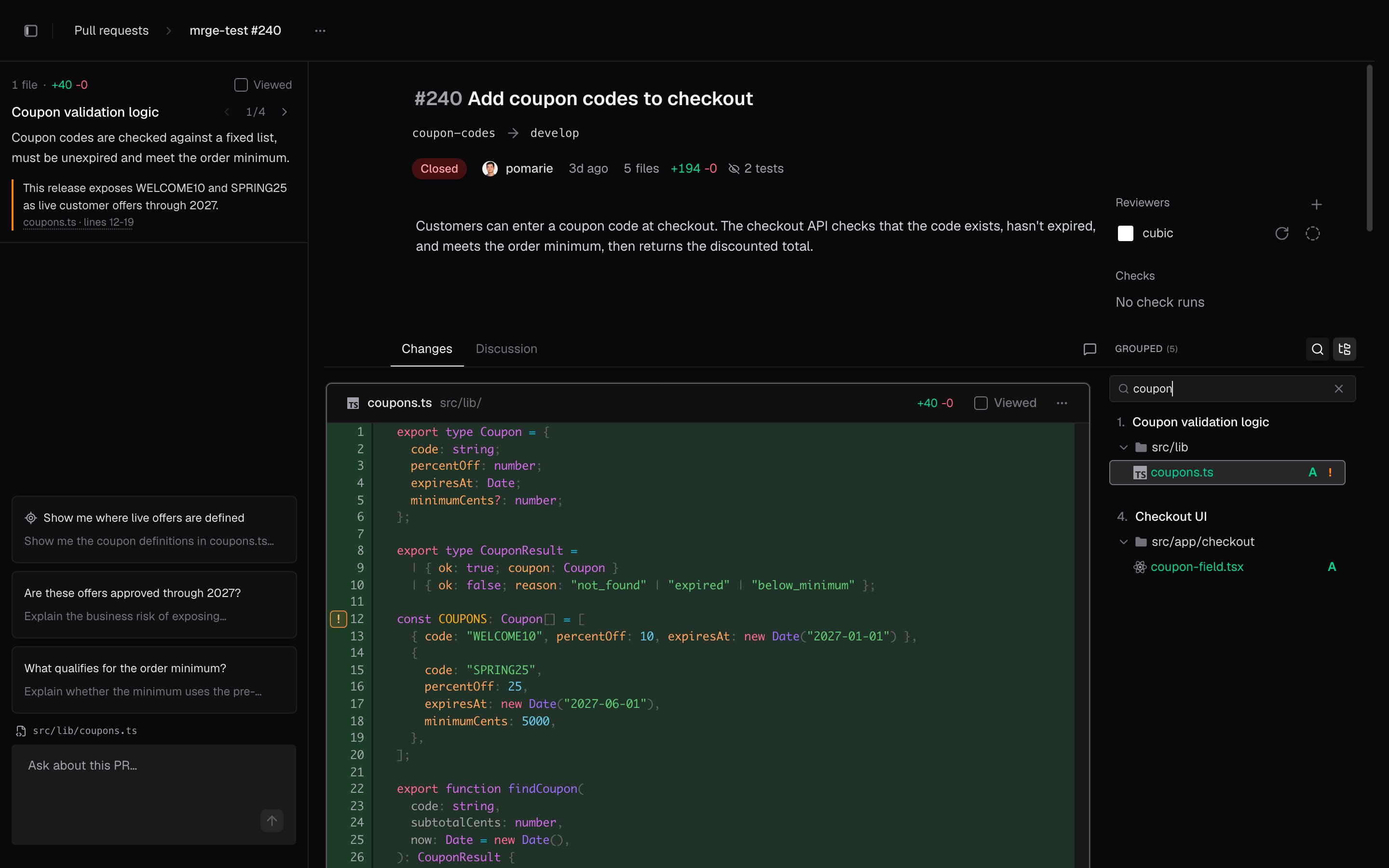
The PR header shows the description, reviewers, and status. Below the header are two tabs:
* **Changes:** Read the diff, navigate files, and leave inline comments.
* **Discussion:** Follow the PR's conversation, reviews, and activity.
Start with the description, then use the [grouped changes](/code-review-platform/intelligent-diff-ordering)
to understand how the implementation fits together. Open [AI chat](/code-review-platform/ai-sidebar)
for a question or a guided tour.
On a stacked PR, the header shows a stack rail with one segment per PR in the stack, colored by
that PR's status, so you can find the PR that blocks the stack. Click the rail to list the stack,
or press `[` to open the PR below and `]` to open the one above.
On a phone, open the file list with **Files** at the bottom of the screen, and the PR actions from
**⋯** at the top.
## Read the diff
Use the file list to jump between files. Choose **Grouped** to follow related changes together,
or **Tree** to browse folders. The list follows the file you're reading. When you know which file
you need, search the file list: the arrow keys step through matching files, and `Enter` opens one.
 To read a file that the diff imports, `Cmd`-click or `Ctrl`-click the import. The file opens
read-only in a panel over the page, at the PR's revision. Press `Esc` to close it.
Open **Diff settings** from the PR actions menu (**⋯**). There you can switch between unified and
split layouts, change the code theme, expand unchanged lines, or hide test files.
When you finish reading a file, mark it **Viewed**. To track your progress through a larger PR,
you can also mark a whole group **Viewed**.
## Review new pushes
To open **Compare versions**, click the version label at the top of the file list. Then choose the
range you want to read:
* **All changes:** The full PR diff against its base.
* **Since previous push:** Changes from the latest update.
* **Since your last review:** Changes since the version you last submitted a review on.
The last two options appear only when there is a previous push or review to compare. For another
range, pick the earlier version under **Base** and the later version under **Head**.
For example, after you request a fix, choose **Since your last review** to check the author's
follow-up. Then use **All changes** to see the fix in the context of the whole PR.
## Leave comments and suggestions
To leave an inline comment, click the comment button beside a line number. To comment on several
lines, select the range first, then click the comment button. For feedback about the whole file,
choose **Add file comment** from the file's **⋯** menu.
After you write a comment, choose one of these options:
* **Add to review** holds it with your other pending comments until you submit your review.
* **Post immediately** publishes it to GitHub right away. Once your review has pending comments,
this option is unavailable, so add each new comment to the review.
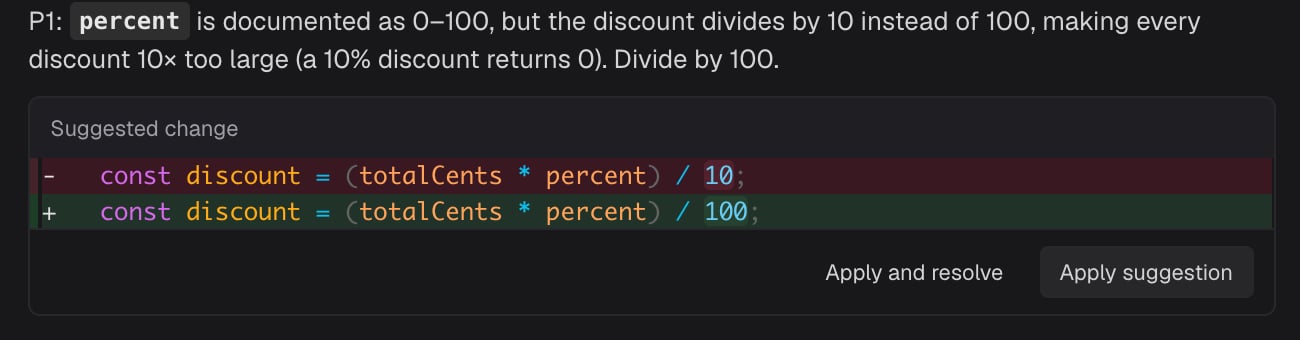
Use Markdown for formatting. To propose replacement code, add a `suggestion` block to an inline
comment:
````markdown theme={null}
```suggestion
const total = items.reduce((sum, item) => sum + item.price, 0);
```
````
A suggestion's preview shows the lines it replaces and highlights the words it changes.
To read a file that the diff imports, `Cmd`-click or `Ctrl`-click the import. The file opens
read-only in a panel over the page, at the PR's revision. Press `Esc` to close it.
Open **Diff settings** from the PR actions menu (**⋯**). There you can switch between unified and
split layouts, change the code theme, expand unchanged lines, or hide test files.
When you finish reading a file, mark it **Viewed**. To track your progress through a larger PR,
you can also mark a whole group **Viewed**.
## Review new pushes
To open **Compare versions**, click the version label at the top of the file list. Then choose the
range you want to read:
* **All changes:** The full PR diff against its base.
* **Since previous push:** Changes from the latest update.
* **Since your last review:** Changes since the version you last submitted a review on.
The last two options appear only when there is a previous push or review to compare. For another
range, pick the earlier version under **Base** and the later version under **Head**.
For example, after you request a fix, choose **Since your last review** to check the author's
follow-up. Then use **All changes** to see the fix in the context of the whole PR.
## Leave comments and suggestions
To leave an inline comment, click the comment button beside a line number. To comment on several
lines, select the range first, then click the comment button. For feedback about the whole file,
choose **Add file comment** from the file's **⋯** menu.
After you write a comment, choose one of these options:
* **Add to review** holds it with your other pending comments until you submit your review.
* **Post immediately** publishes it to GitHub right away. Once your review has pending comments,
this option is unavailable, so add each new comment to the review.
Use Markdown for formatting. To propose replacement code, add a `suggestion` block to an inline
comment:
````markdown theme={null}
```suggestion
const total = items.reduce((sum, item) => sum + item.price, 0);
```
````
A suggestion's preview shows the lines it replaces and highlights the words it changes.
 ## Follow discussions
Read threads next to the diff. Beside the **Changes** and **Discussion** tabs, the button that
counts open threads, such as **3 open**, lists every thread. Filter it to bots or people, open a
thread to jump to the code it refers to, and find resolved and outdated threads collapsed at the
bottom. Reply in a thread, and resolve it once the feedback is addressed.
The **Discussion** tab shows the PR's conversation and review activity in one timeline. From a
comment on code, you can jump to its lines in **Changes**.
## Submit your review
1. Open **Review**. If you have pending comments, open **Finish review** instead.
2. Choose **Approve**, **Comment**, or **Request changes**.
3. Add an overall message, then submit. **Comment** and **Request changes** need a message unless
you have pending comments. **Approve** doesn't need one.
cubic posts your pending comments to GitHub together with the review.
## Check and merge
Open the **Merge** menu at the top right to see reviews, checks, and any conflicts. If you have
merge permission on the repository, you can merge from there once the PR is ready.
On a branch that requires a merge queue, the button reads **Add to merge queue**, and the queue
merges the PR with the method set in the branch's rules. While the PR waits, the menu shows
**Queued to merge**, and **View merge queue** opens the queue on GitHub.
For a PR in a [GitHub stack](https://docs.github.com/en/pull-requests/get-started/about-stacked-prs),
the merge includes every PR below it that hasn't merged yet. The button shows how many PRs that is,
as in **Squash and merge stack** with a `3` badge. Auto-merge isn't available for stacked PRs.
The inbox also groups PRs that build on each other's branches. Until they're a GitHub stack, merge
them one at a time, starting with the one at the bottom. To merge them as a group,
[turn them into a GitHub stack](https://docs.github.com/en/pull-requests/how-tos/create-pull-requests/creating-stacked-pull-requests)
first.
To view the PR on GitHub, choose **Open in GitHub** from the PR actions menu. If the PR has a
Vercel preview, **Open preview deployment** takes you to it.
## Keyboard shortcuts
To see the shortcuts for the current page, open **Keyboard shortcuts** from your user menu. In a
diff, `J` and `K` move between files, `Space` marks the active file viewed, and `R` opens the
review menu.
See [Keyboard shortcuts](/code-review-platform/command-bar) for a short reference and PR search.
This documentation is built and hosted on [Mintlify](https://mintlify.com), a developer documentation platform.
## Follow discussions
Read threads next to the diff. Beside the **Changes** and **Discussion** tabs, the button that
counts open threads, such as **3 open**, lists every thread. Filter it to bots or people, open a
thread to jump to the code it refers to, and find resolved and outdated threads collapsed at the
bottom. Reply in a thread, and resolve it once the feedback is addressed.
The **Discussion** tab shows the PR's conversation and review activity in one timeline. From a
comment on code, you can jump to its lines in **Changes**.
## Submit your review
1. Open **Review**. If you have pending comments, open **Finish review** instead.
2. Choose **Approve**, **Comment**, or **Request changes**.
3. Add an overall message, then submit. **Comment** and **Request changes** need a message unless
you have pending comments. **Approve** doesn't need one.
cubic posts your pending comments to GitHub together with the review.
## Check and merge
Open the **Merge** menu at the top right to see reviews, checks, and any conflicts. If you have
merge permission on the repository, you can merge from there once the PR is ready.
On a branch that requires a merge queue, the button reads **Add to merge queue**, and the queue
merges the PR with the method set in the branch's rules. While the PR waits, the menu shows
**Queued to merge**, and **View merge queue** opens the queue on GitHub.
For a PR in a [GitHub stack](https://docs.github.com/en/pull-requests/get-started/about-stacked-prs),
the merge includes every PR below it that hasn't merged yet. The button shows how many PRs that is,
as in **Squash and merge stack** with a `3` badge. Auto-merge isn't available for stacked PRs.
The inbox also groups PRs that build on each other's branches. Until they're a GitHub stack, merge
them one at a time, starting with the one at the bottom. To merge them as a group,
[turn them into a GitHub stack](https://docs.github.com/en/pull-requests/how-tos/create-pull-requests/creating-stacked-pull-requests)
first.
To view the PR on GitHub, choose **Open in GitHub** from the PR actions menu. If the PR has a
Vercel preview, **Open preview deployment** takes you to it.
## Keyboard shortcuts
To see the shortcuts for the current page, open **Keyboard shortcuts** from your user menu. In a
diff, `J` and `K` move between files, `Space` marks the active file viewed, and `R` opens the
review menu.
See [Keyboard shortcuts](/code-review-platform/command-bar) for a short reference and PR search.
This documentation is built and hosted on [Mintlify](https://mintlify.com), a developer documentation platform.